Conversion values for demand settings
The detailed settings on the demand monitoring screen include a parameter called "conversion value."
This parameter is important when calculating the demand power.
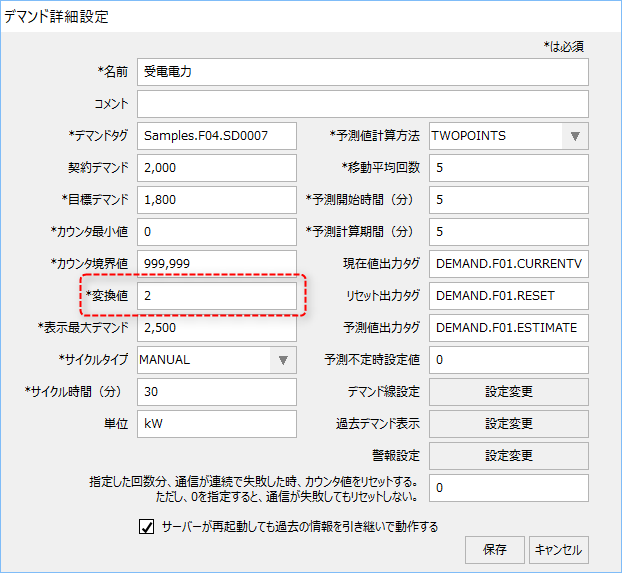
For demand monitoring with a demand time limit of 30 minutes, if the pulse rate of the monitored energy tag is 1 kWh per pulse, set the conversion value to "2".
The reason for this is that when calculating demand power from the amount of power used (kWh), the demand power (kW) is calculated by "double" the amount of power used for 30 minutes (kWh). For example, if a 300kW load is used continuously for 30 minutes, the amount of power used for 30 minutes is 150kWh, and the demand power is 150 multiplied by 2, or 300kW. In other words, the demand power is calculated internally as the amount of power multiplied by the conversion value.
With this in mind, if the counter value of the energy tag being monitored for demand is weighted (for example, 10 kWh per pulse), you can handle it in one of the following ways:
(Example: 10kWh per pulse)
•Use the tag's filter function to "shift decimal places" and align the counter units to 1 kWh when they are imported from PLC to the tag. In this case, the conversion value can be set to "2".
•If you do not use the tag filter function, you can specify "20" as the conversion value (in this case, the counter value x 20 will be the demand power).