overview
The default maximum number of facilities that can be registered is set to 30. This setting can be increased in increments of 10 up to a maximum of 100 facilities.
To change the settings to increase the number of facilities, please follow the steps below.
Step 1) Edit the operation monitoring system configuration file
Edit the operation monitoring system configuration file (systeminfo.cfg) with a text editor and change the parameter for the number of facilities.
Step 2) Edit the summary field master for the operation monitoring summary action
The standard Summary Field Master has equipment settings for 30 pieces of equipment registered, but in addition to this file, the folder in which the Summary Field Master is stored contains master files with equipment defined in increments of 10 (for 10 pieces of equipment, 20 pieces of equipment, ... up to 100 pieces of equipment). By changing the names of these files, you can prepare a Summary Field Master file for the desired number of pieces of equipment.
|
It is possible to increase the upper limit of the number of facilities after the operation monitoring system has already been put into operation,Please note that once you have increased the number of facilities, you cannot decrease it.. |

|
When increasing the number of facilities, the system processing load may increase by the amount of the increased number of facilities. Please be careful when adding facilities as this may affect a system that was previously operating stably. The maximum number of facilities on the system can be set to 100, but we do not guarantee that it will function perfectly. |
How to change the maximum number of facilities
Step 1) Edit the operation monitoring system configuration file
Open the operation monitoring system configuration file "systeminfo.cfg" in a text editor and change the parameter for the number of facilities.
The system configuration files for operation monitoring are stored in:
(Project folder)\server\config\machinestatus\systeminfo.cfg
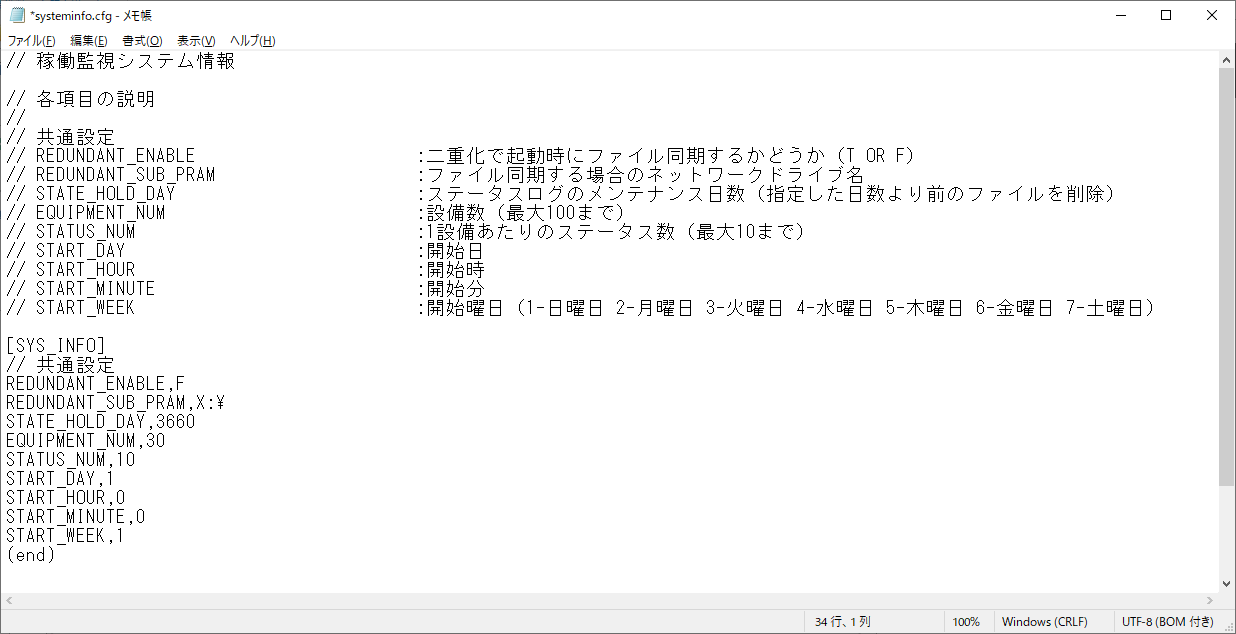
Below is an example opened in Notepad. The default settings are as follows:
(Default setting)
Below is an example where the limit is set to 40 facilities.
•Set EQUIPMENT_NUM to "40".
(Example of change)
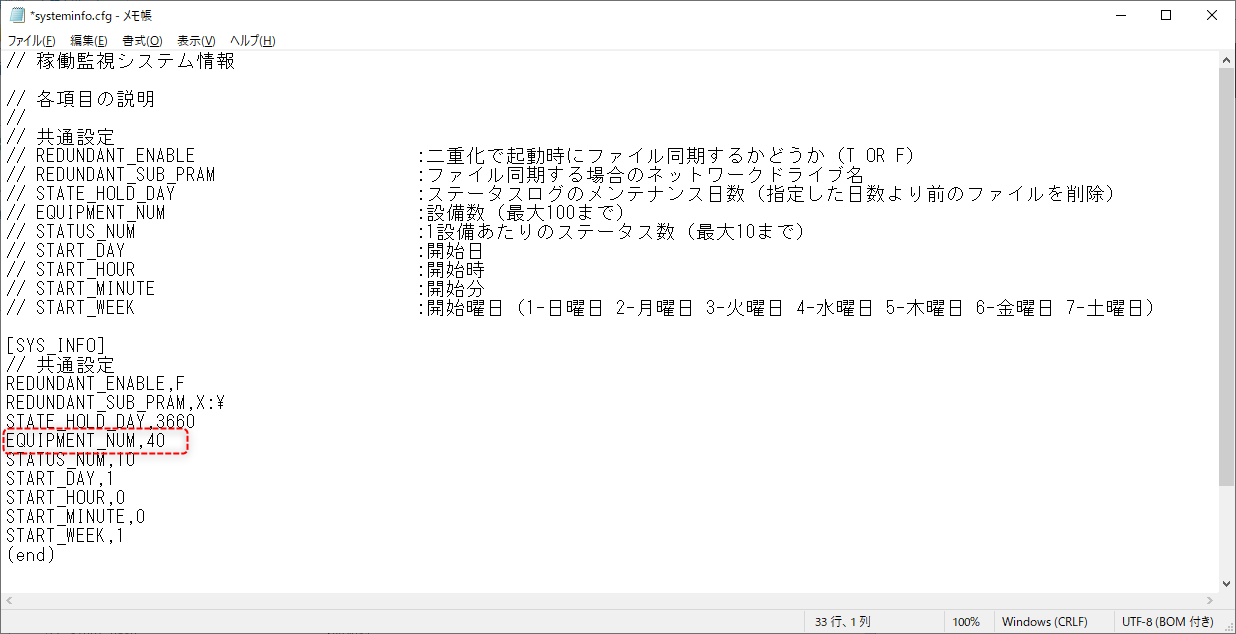
Furthermore, please define the number of facilities to increase in increments of 10 (up to 40, 50, ... 100).
Step 2) Edit the summary field master for the operation monitoring summary action
Next, we will prepare the summary field master for the summary action.
The summary field master for the operation monitoring summary action "MachineStatus.Summary" is stored in the following folder.
(Project folder)\server\machinestatus\summary\
When you open the above folder in Explorer, you will see the following files:
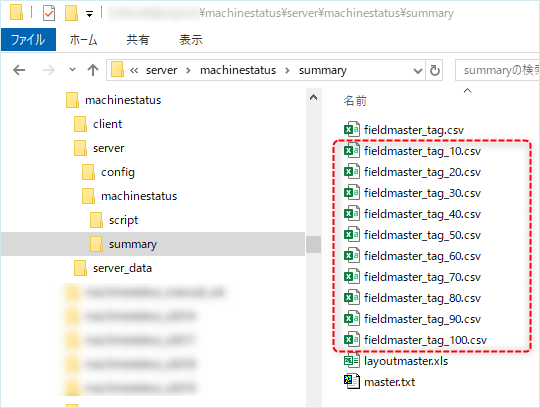
Of the above, "fieldmaster_tag.csv" is the current summary field master.
In addition, the following files are pre-prepared summary field masters with equipment added.
•fieldmaster_tag_10.csv ・・・Definition file for 10 facilities
•fieldmaster_tag_20.csv ・・・Definition file for 20 facilities
•fieldmaster_tag_30.csv ・・・Definition file for 30 facilities
•fieldmaster_tag_40.csv ・・・Definition file for 40 facilities
•fieldmaster_tag_50.csv ・・・Definition file for 50 facilities
•fieldmaster_tag_60.csv ・・・Definition file for 60 facilities
•fieldmaster_tag_70.csv ・・・Definition file for 70 facilities
•fieldmaster_tag_80.csv ・・・Definition file for 80 facilities
•fieldmaster_tag_90.csv ・・・Definition file for 90 facilities
•fieldmaster_tag_100.csv ・・・Definition file for 100 facilities
There is no need to change the contents of the above file. Copy the file you want and change the file name to "fieldmaster_tag.csv".
As an example, we will introduce the procedure for changing the number of facilities to 40.
■ Example of procedure
1.Rename "fieldmaster_tag.csv"
Example: "fieldmaster_tag.csv" → "fieldmaster_tag_bk.csv" *We recommend that you leave the previous file "fieldmaster_tag.csv" and not delete it.
2.Copy "fieldmaster_tag_40.csv" and rename the file to "fieldmaster_tag.csv".
Example: "fieldmaster_tag_40.csv" → "fieldmaster_tag.csv" *We recommend that you leave the original "fieldmaster_tag_40.csv" and not delete it.
After changing the settings, please bring Panel Server and Panel Browser online again.