Slow down the logging cycle for operation monitoring
The logging cycle for operation monitoring is set to 1 second by default, but this setting can be extended up to 30 seconds.
The cycle of this logging process is defined by the following Scheduled event registered in Panel Server.
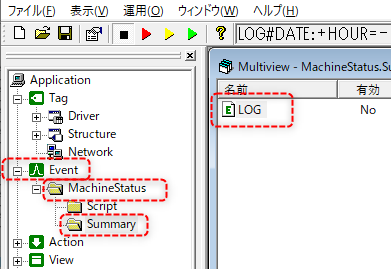
Event/MachineStatus/Summary/LOG
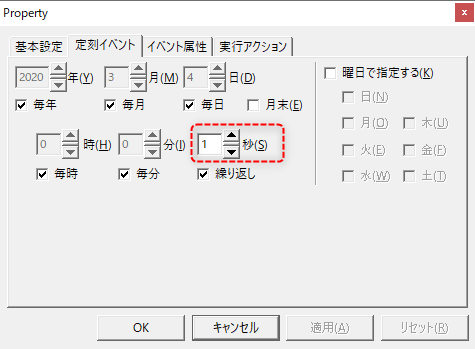
To change the settings, display the properties of the Scheduled event "LOG" above and change the following part.
(H2bff1be1 settings dialog)
|
For example, if you want to change the logging cycle to 2 seconds, change the "1" on the left to "2."
|
|
When changing the logging interval for operation monitoring, please note the following:
•If the various states defined in the operation status collection settings can change faster than the logging cycle, the state may be missed. For example, if the logging cycle is set to 5 seconds, and a state change such as running or stopped occurs faster than that, the change cannot be detected. In such cases, you will need to take care to set the signal retention time on the downstream side to be longer than the logging cycle. •The various times for operation monitoring are tallied in units of the logging cycle. For example, if you change the logging cycle to 5 seconds, even if the actual operation time is less than 5 seconds, it will be tallied in 5-second units.
|
