Precautions when changing settings after operation has started
The following table lists precautions to take when changing equipment settings after the system has started operating.
case |
Notes |
supplementary explanation |
If a facility ID that is already in use is reassigned to another facility after operation has started. |
If a facility ID that was used for another facility is reassigned to another facility after operation starts, the log data that was saved as information about the previous facility before the change will be processed as information about the newly assigned facility.
Therefore, unless there is a special reason, do not assign a facility ID that is already in use to other facilities.
|
Operation monitoring log data is saved by equipment ID. If you assign an equipment ID that has already been used, the previously saved log data will be used. |
If the "aggregation classification" of the operating status is changed to another classification after the start of operation. |
Log data before the change in the aggregation classification will be processed as data for the new aggregation classification. For example, if the aggregation classification for Status ID 1 was "Stopped" and is changed to "Abnormal" after operation starts, the ON time and ON count for Status ID 1 that were previously aggregated as "Stopped" will all be aggregated and displayed as "Abnormal". |
Operation monitoring log data is saved as the ON time and ON count for each status ID in terms of equipment ID, and the display for each aggregation category is calculated each time the screen is displayed. Therefore, previously saved log data will be calculated as the newly set aggregation category and displayed on the screen. |
For details about the above, please also refer to the description in "(Reference) Overview of logging and aggregation processing of the operation monitoring function" at the bottom of this page.
|
If the configuration of the monitored equipment changes significantly after you start using operation monitoring (for example, if the conditions for detecting the operation status change significantly), you need to determine whether you can handle the situation by adding conditions to the current settings of the equipment, or whether you should re-register it as a new equipment. If the configuration will change significantly, add it as a new equipment and assign it an unused equipment ID.
Regarding the settings of old equipment, you can set it as follows so that the values of the equipment will not change and you can view the past data (since the log data will be maintained as is, you can view the past operating status on the operation analysis screen, etc.).
■ Example of settings for keeping old facilities for viewing •Leave the operation status tag/condition expression settings blank. •If you have been collecting production results, select "Do not collect production results" as the production results collection method. •If production targets were set, all weekly target values are set to 0. Also, if individual targets were set, all target values are set to 0 from the day the use of the equipment is terminated.
If you do not need to refer to past data, you can delete the facility registration itself. However, be careful not to assign a facility ID that has already been used in the past to a new facility.
|

|
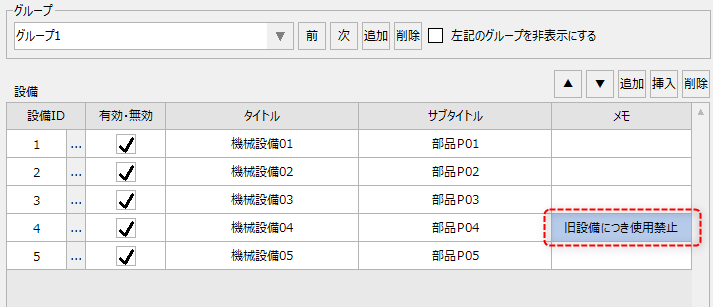
If you want to delete facility information after operation has started, you can leave a note such as "prohibited" in the notes field on the facility registration screen before deleting the facility from the group. This will allow you to view the note information in the facility ID selection dialog.
Below are the setup steps.
1.First, display the group on the facility registration screen, enter any information into the notes for the facility you want to delete, and click the "Apply" button to save it.
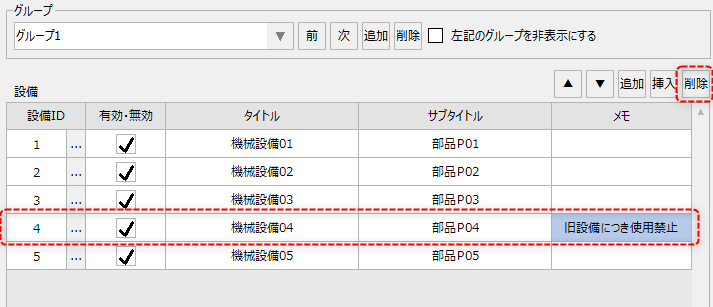
2.Next, click the row of the facility you want to delete to select it, and then click the "Delete" button. In this example, we will delete facility ID 4.
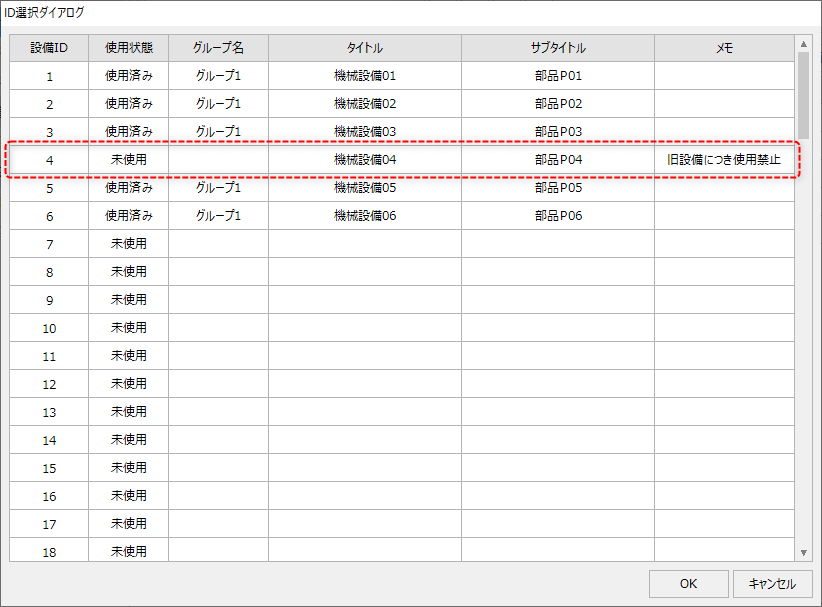
3.In the facility ID selection dialog, the facility ID 4 usage status will be marked as unused, and the above registration information will remain in the memo field.
|

(Reference) Overview of logging and aggregation processing of operation monitoring function
The operation monitoring function automatically collects data required for each screen display based on the equipment information (equipment ID, etc.) registered on the equipment registration screen and the operation status setting information (status ID, aggregation category, tag condition expression, etc.) registered on the operation status collection setting screen, and performs logging and aggregation processing.
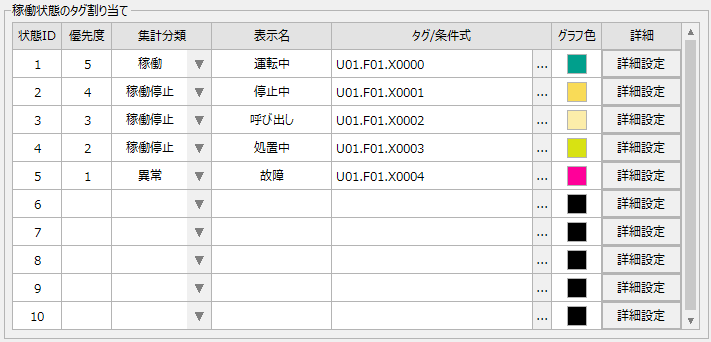
Various log data generated by the operation monitoring function is saved for each "status ID" under the "equipment ID" area assigned to the equipment. A status ID is a sequential number that indicates 10 areas prepared in advance in the operation status collection settings. In the aggregation process, the aggregated values of the ON time and ON count for each status ID are saved as aggregated data according to the tag/conditional expression settings.
(Example of operation status collection settings definition)
The operation performance screen and operation analysis screen are designed to obtain aggregated data for the target date specified on the screen, and then calculate and display various figures on the screen.
For example, calculations such as operating time, downtime, abnormal time, and other time, which need to be further aggregated for each aggregation category, as well as calculations of operating rates and takt times, are also performed when displayed on the screen.
(Examples of display items calculated from aggregated data when displayed on the screen)
•Operation time, stop time, abnormal time, other time
•Number of operations, number of stops, number of abnormalities, other
•Operation rate, outage rate, abnormality rate, other rates
•Production variance, performance evaluation, progress rate, takt time, etc.
Therefore,If a facility ID that was used for another facility is reassigned to another facility after operation has started, please note that log data that was saved as information on the facility before the change will be processed as information on the newly assigned facility. Similarly, if the "aggregation classification" of the operation status is changed to another classification after operation has started, please note that the past log data saved for each status ID will be processed as data for the new aggregation classification. For example, if the aggregation classification for status ID 1 was "stopped" and is changed to "abnormal" after operation has started, the ON time and ON count for status ID 1 that were previously aggregated as "stopped" will all be aggregated and displayed as "abnormal."