How data sharing works
With the duplex function, data is automatically shared between the main and sub Panel Server. Shared data includes server data such as alarm data (Alarm server actions), logging and aggregation data (summary actions), and disk retention values of memory device tags.
To share data in a duplicated system, we use the "Network Sharing" feature provided as a standard feature of the Windows OS.
First, set up network sharing between the primary (main) and standby (sub) PCs, and configure Windows so that they can share each other's disk drives over the network.
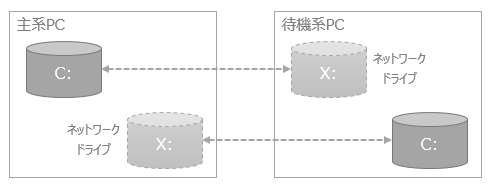
Next, in the duplication processing settings for various functions (actions, etc.) that support duplication, specify a folder under the disk drive of the primary PC as the "Main Folder" setting for the data storage location, and specify a folder under the disk drive of the standby PC as the "Subfolder" setting. When Panel Server is executed online in duplication mode, each action that has duplication processing settings will output data to both the main folder and subfolder simultaneously. This mechanism allows data to continue as it was before the duplication was switched, even after the main and sub duplication were switched.
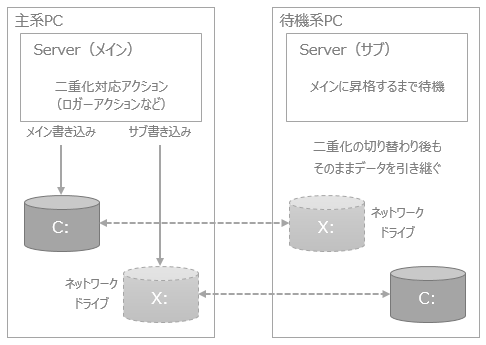
|
When specifying the drive letter (such as "C:" or "X:") in the Windows network sharing settings, set it so that it is the same name on the primary and standby PCs. By setting it in this way, the primary and standby PCs will be able to use the Panel Server configuration files in common. |

File Sync
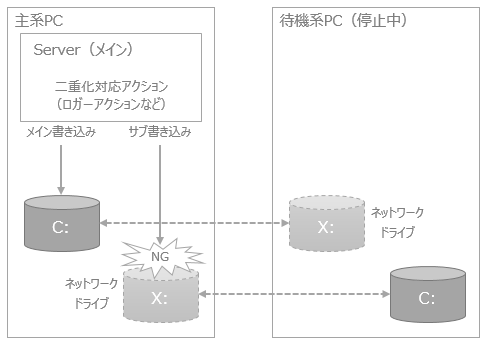
Each action that supports duplication writes data to the main folder and subfolder simultaneously, but if the other PC is not running from the perspective of the currently running Panel Server (for example, the PC is not turned on), data will only be written to the folder on your own PC that you set as the main folder. In other words, during this time, the data will only exist on one of the PCs.
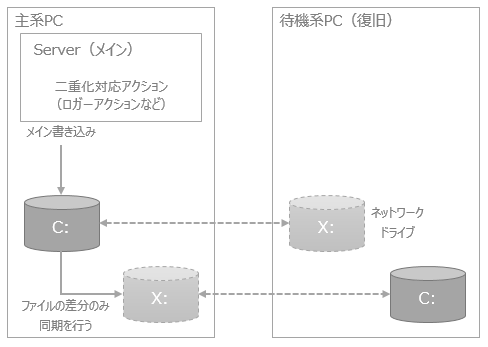
And when Panel Server detects the recovery of the other PC, it will automatically synchronize the differences in data files between the main folder and the subfolder. This function maintains the consistency of data files between both PCs.
•An error has occurred (other PC unknown)
•During recovery
About redundant interfaces
To operate Panel Server in a redundant configuration, you need to configure the Redundancy interface.
For more information about redundant interfaces, see "Redundancy Interfaces".