What is duplex function?
FA-Panel provides a function for operating Panel Server in a duplicated configuration. With the FA-Panel duplication function, you can prepare two PCs, a main PC/ and a standby PC, and run Panel Server as the main and sub, to make various server processes such as communication with PLC and logging redundant.
|
When operating in a redundant configuration, server processes are executed only on the main Panel Server, and the sub Panel Server is in a standby state until a redundancy switch occurs. When a redundancy switch occurs, the sub Panel Server that was on standby until then is automatically promoted to the main and starts the server process.
|
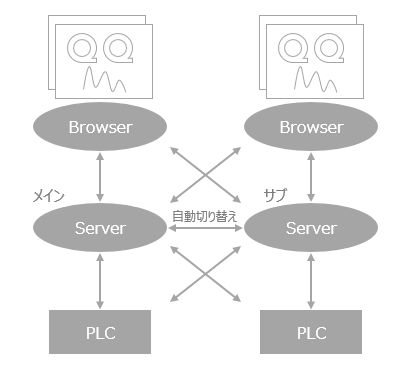
|
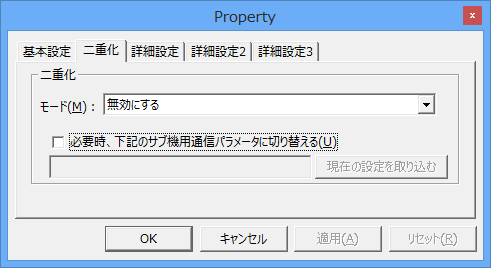
The "Unit" settings defined for communicating with PLC etc. also have a duplication setting item, but this setting is a function to support a PLC (CPU) duplication configuration. This article only describes matters related to Panel Server duplication and does not explain PLC duplication. For details on this function, please refer to the Device Connection Reference "PLC Duplication Setting".
|

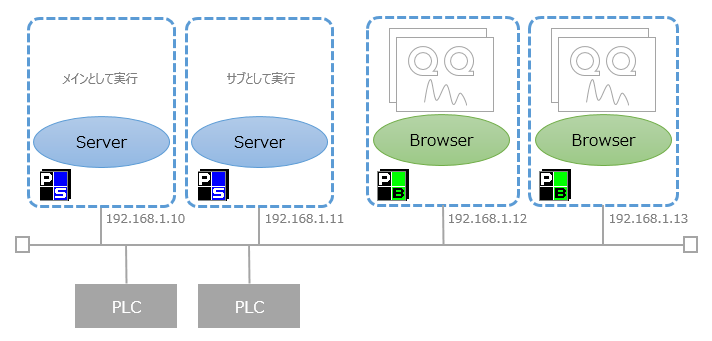
Example of operation configuration
In a duplicated server configuration, Panel Server runs on each of the two PCs. During normal operation, the main server runs and the sub server is in standby mode. Panel Browser automatically connects to the running Panel Server and displays the client screen.
License for duplication
When operating FA-Panel in a duplicated configuration, a license key is required for each Panel Server, both main and sub. For example, if you are duplexing a system that requires 10 client licenses, you will need to insert a license key for 10 or more client licenses into each PC that runs Panel Server, the main system, and the standby system.