Example of operation configuration
When operating in a client/server configuration with multiple PCs, as long as the PC running Panel Server does not stop, there will be no impact on logging data, etc. even if other client PCs stop working.
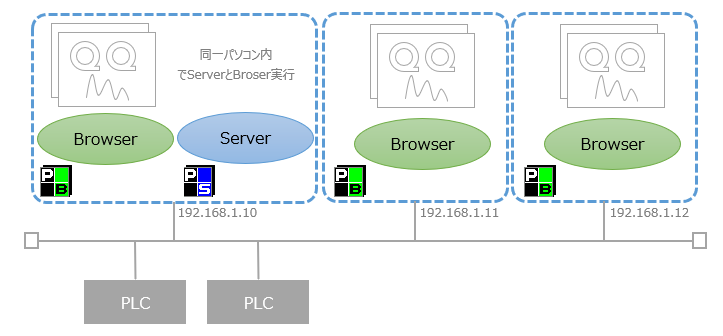
■ Run Panel Server and Panel Browser on the server PC
In this configuration, Panel Server and Panel Browser are started on one PC, and Panel Browser is also started on multiple client PCs. In this way, Panel Server and Panel Browser can run simultaneously on the same PC.
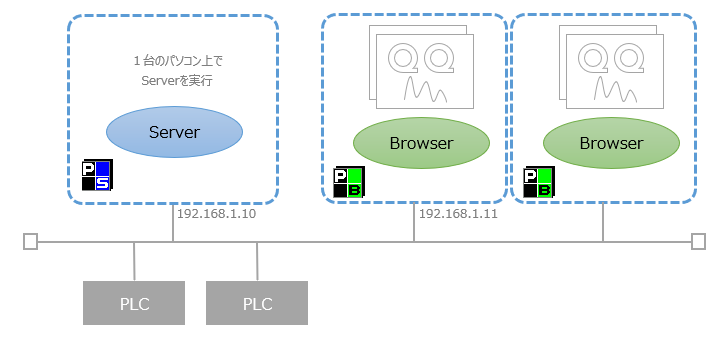
■Only run Panel Server on the server PC
It is not necessary for Panel Browser to run on a server PC that runs Panel Server. If you do not need to display the monitoring screen on the server PC, you can configure it to run only Panel Server.
Connection settings between Panel Server and Panel Browser
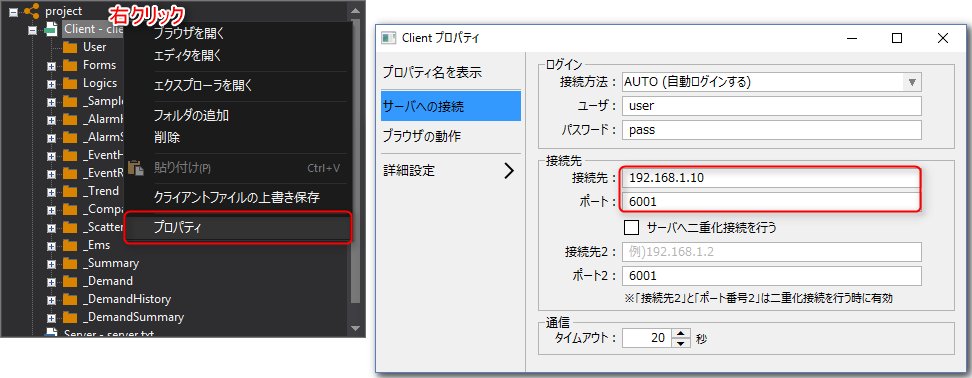
If you are running Panel Browser on multiple PCs, you will need to configure the following settings to connect between Panel Server and Panel Browser.
Property Name |
Setting contents |
Property Overview |
Connect to (PSNode) |
Server IP address |
The IP address of the server. If the server and browser are running on different PCs, you must specify the server's IP address or node name. |
port (PSPanelPort) |
6001 |
The server port number. The default port on the server side is 6001. |