overview
To execute Alarm server, you need to register a Periodic event to repeatedly call the Alarm server action.
(Periodic event)
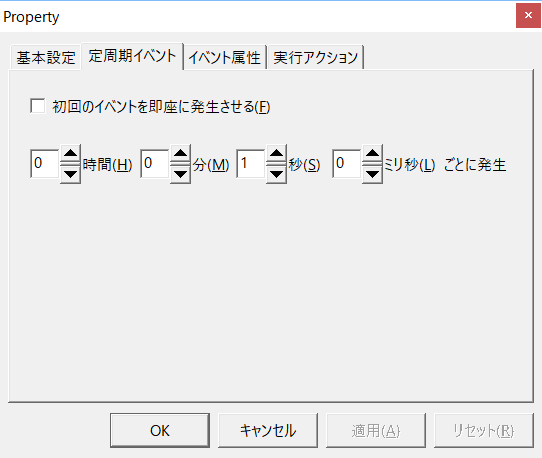
The most basic setup is to create a single Periodic event with a 1 second period and specify the Alarm server action as the execution action.
This call from Periodic event is the heartbeat that runs the underlying processing of Alarm server.
If you want to use other special functions, such as alarm emails, you will need to register an event other than the above events and configure it according to the processing.
Below is an example of setting up an event to execute Alarm server.
Periodic calls for basic processing of Alarm server
The most basic setting example is explained below.
First, add one Periodic event to execute the Alarm server action and set the period to 1 second.
Then, from the "Execution Actions" tab of the Periodic event above, register the Alarm server action as the execution action.
In this case, you do not need to specify any parameters for the action.
Below is an example where "Alarm" is specified as the action name for Alarm server.
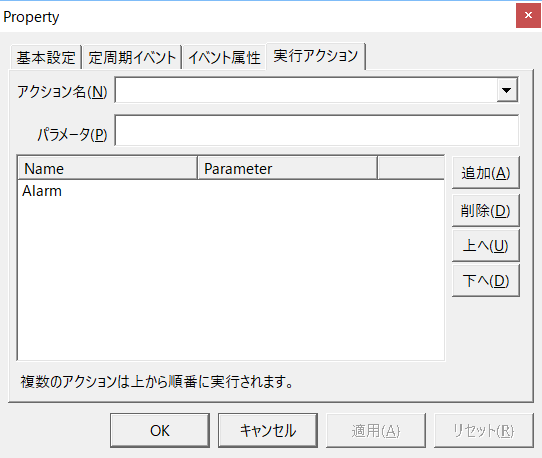
The above settings will cause Alarm server to run at a fixed interval.
Alarms are detected each time the tag value changes. Detected alarms are temporarily stored in a message queue inside Alarm server, which checks the message queue when called by the above Periodic event, and if there is an alarm in the queue, it writes it to disk and notifies the client of the alarm.
Execution parameters for Alarm server
When Alarm server is called with parameters specified, it performs processing according to the parameters.
To specify parameters for an action, specify them as strings in the "Parameters" field on the "Execution Action" tab of the event settings screen.
Alarm serverAction parameters are of the following types:
Parameter Characters |
Operation |
(Not specified) |
It checks for alarms stored in the queue, and if an alarm is found, it generates an alarm and notifies the client. (Note: Alarm detection is performed separately from the execution of Alarm server, and detected alarms are temporarily stored in the queue.)
|
Sends alarm emails that have accumulated in the email queue. If "When multiple alarms occur, send them in a single email" is checked, alarms that have accumulated in the email queue will be sent in a single email when the action is executed.
|
|
RELOADMAILMASTER |
Reloads the mail master file. If you want to change or add email destinations while the system is running, first edit and save the mail master file using an external application such as Panel Browser or VisualBasic. Next, execute the Alarm server action in an event with the RELOADMAILMASTER parameter (such as Tag event), which will reload the edited mail master file. After reloading, execute the Alarm server action in an event with the MAIL parameter to send email with the edited contents.
This parameter is not intended to be called from a recurring event, so make sure you call it from something like Tag event.
|
RELOADALARMMASTER |
Reloads the alarm master file. If you want to change or add alarm conditions while the system is running, first edit and save the alarm master file. Then, when you execute an alarm action with an event that has the RELOADALARMMASTER parameter added (such as Tag event), the alarm master file will be reloaded and alarm monitoring will be performed with the edited contents.
This parameter is not intended to be called from a recurring event, so make sure you call it from something like Tag event.
|
ACKALL |
This will acknowledge all alarms. If you want to acknowledge alarms using an external device such as a button on a control console, you can do so by specifying the ACKALL parameter from Tag event, etc., and executing the action.
This parameter is not intended to be called from a recurring event, so make sure you call it from something like Tag event.
|
Below is an example of specifying the MAIL parameter for Alarm server "Alarm".
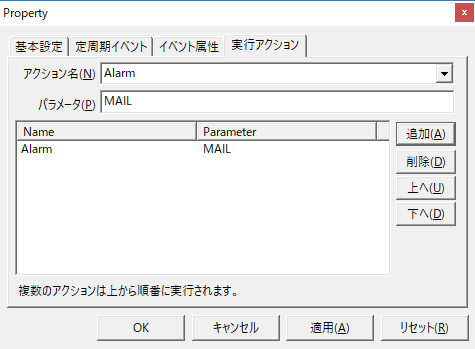
When setting up alarm emails, in addition to the Periodic event for calling the basic processing, you will also need to add a separate Periodic event for processing alarm emails, and call it by specifying the Send mail parameter "MAIL".
|
Please do not call "RELOADMAILMASTER", "RELOADALARMMASTER", or "ACKALL" from events that are executed repeatedly in a short period of time. Always call them from Tag event or similar. |
