overview
Indirect tag referencing is a convenience feature that allows you to indirectly bind to an object and dynamically switch the actual tag reference at runtime.
With indirect tag references, a special tag name called an "indirect tag" is temporarily assigned to an object, and the actual tag reference is made by calling the root "SetAliasTag" method.
Indirect tags must be defined with an "@" at the beginning..
By using this function, you can switch the tag assigned to an object depending on the purpose, and use the form as a common screen. An example of usage is shown below.
Usage example 1)
In an equipment monitoring system, equipment with the same specifications must be displayed on separate screens. If the configuration of each screen is exactly the same and only the tags assigned to them are different, it would be inefficient to create individual screens for each piece of equipment. Therefore, by defining the parts of each screen where there are differences in tags with indirect tags, and setting the actual reference tag from a script when calling up the screen, it becomes possible to standardize the screens for each piece of equipment using a single form.
Example 2)
When accepting equipment operation instructions from the screen, it may be necessary to display a final confirmation pop-up screen. In this case, the only difference between the pop-up screens is the tag that is written after the operation is confirmed, and in most cases the format of the confirmation screen can be reused with exactly the same specifications. Even in such cases, by using indirect tags, the tag to be written to can be dynamically switched, and standardization can be achieved by simply displaying one form in a dialog.
Here we will explain using an example that uses indirect tags.
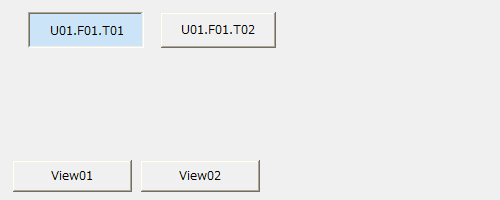
Download the sample
This sample is stored in:
setting
Tag configuration
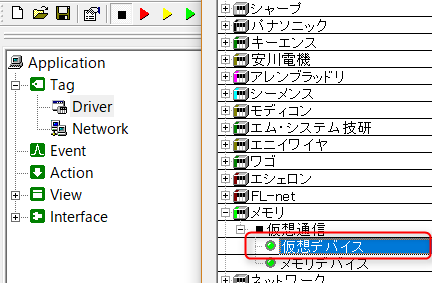
1.Right-click "Driver" and add a virtual device from "Add Unit".
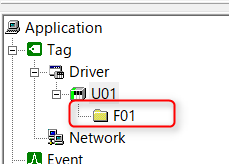
2.Right-click on the added unit "U01" and add "F01" from the Add Folder menu.
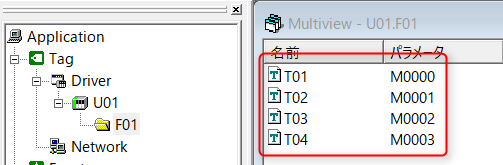
3.Right-click the added folder "F01" and register tags "T01" to "T04". After registration, register the tag's "Device" as "02-M Internal Relay".
|
For details about the virtual device tags used here, see "Virtual Devices". |

program
Describes how to handle indirect tag references.
*Please refer to the sample for object placement and property settings.
1.Write the following in the "btnView01" button object of the base "Form01" form.
event OnMouseUp(button) { if(button == 1){ ::SetAliasTag(c("@TAG01","@TAG02"), c("U01.F01.T01", "U01.F01.T02") ); parent.view.OpenForm("View", "frm_View"); } } |
2.Write the following in the "btnView02" button object of the base "Form01" form.
event OnMouseUp(button) { if(button == 1){ ::SetAliasTag(c("@TAG01","@TAG02"), c("U01.F01.T03", "U01.F01.T04") ); parent.view.OpenForm("View", "frm_View"); } } |
3.Write the following in the "View" form object called by the button.
event OnInitialize() { this.btn01.Text = ::GetAliasTag("@TAG01"); this.btn02.Text = ::GetAliasTag("@TAG02"); } |
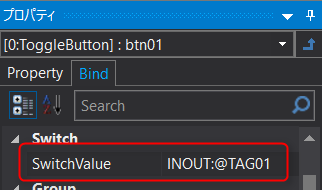
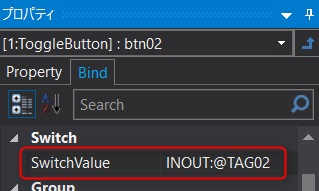
4.Set the following for the bindings of "btn01" and "btn02" of the "View" form called by the button.
Commentary
To use indirect tags, call the route method "SetAliasTag" method immediately before calling the form to set the tag path you actually want to reference. If you want to set references to multiple indirect tags, use the "SetAliasTag" method to set them as an array. By doing so, the parts that use indirect tags will be replaced with the actual tags for processing.
Indirect tags are bound to indirect tag names such as "@TAG01" and "@TAG02" instead of tag paths wherever you want to use them. (*Indirect tags do not need to be registered in Panel Server.)
You can also use the "GetAliasTag" method to obtain the actual tag path referenced by an indirect tag.
|
The "SetAliasTag" method can be called any number of times. Therefore, the actual reference of an indirect tag can be changed any number of times. This is possible even when the form is displayed. For example, real-time changes are possible, such as dynamically switching to display a different tag value by clicking a button placed on the form. |