overview
If you want to read and write tag values by linking them to a control, you can easily do so without scripting by using the Binding function. On the other hand, if you need to make decisions based on detailed conditional statements or write all at once, you can freely read and write tag values using scripts.
This chapter describes the basics you need to know to access tags from a script for reading and writing.
Tag access procedure
■ First, add tag
To access a tag from a script, you must declare (register) the tag you want to access by calling the "AddTag" method. "AddTag" can be called from each object.
Typically, you would call AddTag in the "OnInitialize" event to register a tag.
■ After AddTag, call the tag access method.
After calling AddTag, the following methods become available for the tag:
GetVal / ReadVal / WriteVal / ReadRefresh / WriteRefresh / ReadRequestRefresh / WriteRequestRefresh
Furthermore, because "AddTag" is performed on a per-object basis, you must be aware of which object "AddTag" is being performed on. Please note that each of the methods mentioned above must be called as a method of the object that performed "AddTag". For example, to read a tag that was "AddTag" in Form01 using GetVal, you must do so via the Form01 object.
Also, when the value of the registered tag changes, the OnTagValueChanged event of the object that performed "AddTag" will be called, and the change in the tag value will be detected as an event.
|
Since background forms operate as forms that are always present during execution, if there are tags that need to be read and written frequently from scripts, you can perform AddTag on the background form and perform GetVal etc. from other usages via the background form (this can also be done with the root object). For details, see "Background Forms". |

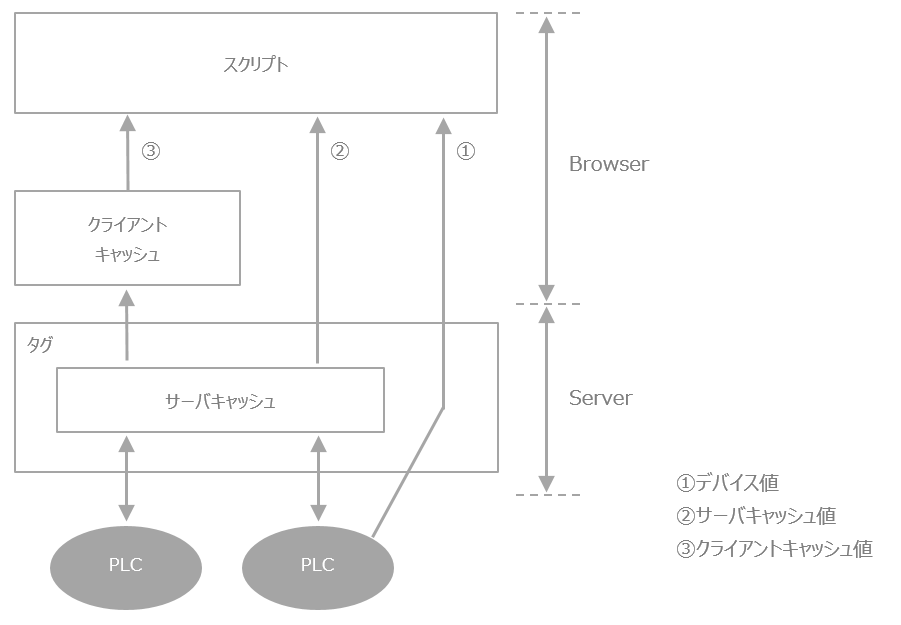
Some methods for getting values from tags allow you to specify the data source for the tag.
Tags in FA-Panel are exchanged via three routes: device value, server cache, and client cache. Cache values are periodically updated by device values. If you want to reliably obtain the actual device value, you can obtain it directly from the device value, but obtaining it from the cache will provide higher performance.
The choice of which route to take to retrieve tag values depends on the requirements of your application, but the general idea is to retrieve device values only when you need to be sure you have the latest current value, otherwise prioritize performance by retrieving a cached value.
Example of AddTag processing (bulk registration using arrays)
If you have many tags you want to reference within an object, it is inefficient to call "AddTag" for each tag.
Since you can pass an array as a parameter to "AddTag", you can store the tags you want to use with "AddTag" in an array and then call "AddTag" with just one line of code.
Example) AddTag Pass the tag names you want to add as an array
// Example for Form01
event OnInitialize()
{
	var TP = “U01.F01.”; // Tag path prefix

	// Define the tags you want to AddTag as an array
	var vTags =
	c(
		TP + “D0000”, TP + “D0001”, TP + “D0002”, TP + “D0003”, TP + “D0004”,
		TP + “D0005”, TP + “D0006”, TP + “D0007”, TP + “D0008”, TP + “D0009”,
		TP + “M0000”, TP + “M0010”, TP + “M0011”, TP + "M0012", TP + "M0050"
	);

	// Pass array to AddTag
	this.AddTag( vTags );
}
AddTag processing example (write-only tag)
In the second argument of "AddTag", you can specify a flag to indicate whether or not to retrieve the value of the added tag (TRUE: retrieve value, FALSE: do not retrieve value. If omitted, it will be treated as TRUE). For tags that clearly only perform write operations, you can reduce the processing load associated with unnecessary value retrieval by specifying FALSE in this argument.
Furthermore, if FALSE is specified, the "OnTagValueChanged" event will not occur either.
Example: AddTag without value retrieval
// Example for Form01
var TP = "U01.F01."; // Tag path prefix

event OnInitialize()
{
	// Define the tags you want to AddTag as an array
	var vWriteTags = c( TP + "D0", TP + "D1", TP + "D2", TP + "D3", TP + "D4" );

	// Pass the array to AddTag (do not retrieve values)
	this.AddTag( vWriteTags, F );
}
Reading/writing tags from script
Tags that have been added using "AddTag" can be read and written by calling methods such as "GetVal" and "WriteVal".
In most cases, when reading a tag, use "GetVal". "GetVal" reads the tag value from the cache, so processing is fast (if you want to read the value on the actual device, use "ReadVal"). When writing to a single tag, use "WriteVal".
Since "AddTag" is performed on a per-object basis, you need to be aware of which objects "AddTag" has been applied to.
Example: Reading/writing tags from a script
// Tags to be added to Form01
event OnInitialize()
{
	//AddTag
	var vTags = c( "$D0", "$D1", "$D2", "$D3" );

	//Pass as an array to AddTag
	this.AddTag( vTags );
}

// Tags to be read and written from Btn01 object (button) on Form01
event OnMouseUp( button )
{
	var vWork = 0;

	/*
	* Tag reading by GetVal
	*/
	if(parent.GetVal(“$D0”) == 1) {
		// When tag $D0 is 1, store $D1 + $D2 in variables
		vWork = parent.GetVal(“$D1”) + parent.GetVal(“$D2”);
	}
	else {
		// Otherwise, store $D1 * $D2 in variables
		vWork = parent.GetVal(“$D1”) * parent.GetVal(“$D2”);
	}

	/*
	* Write tag using WriteVal
	*/
	if(parent.WriteVal(“$D3”, vWork) == F) {
		//If an error occurs, it will return False, so write error handling here
	}
}
|
"GetVal" gets the tag value from the client cache. There is a time lag between calling "AddTag" and the client cache is actually updated, so even if you call "GetVal" immediately after calling "AddTag", the value may not be retrieved correctly. If you have such a processing requirement, you can refresh the client cache by calling "ReadRefresh" before calling "GetVal". (Note, however, that calling "ReadRefresh" may affect the performance of the entire system. Please consider carefully before using it.) For more information, see "ReadRefresh".
|
Bulk tag read/write from script
Using arrays allows you to read/write multiple tags in bulk from a script. For example, this is useful when you want to get multiple tag values in bulk during initialization, or when you want to write multiple parameters in bulk when you operate a button. You can get the same results by repeating single tag operations, but since the system is burdened with each method call, it is smarter to process in bulk.
Bulk reading can be done with "GetVal". "GetVal" can handle arrays, so bulk reading is possible by passing parameters as arrays. For bulk writing, use "WriteRefresh" (note that "WriteVal" cannot specify arrays).
Example: Bulk loading/writing of tags from a script
// Read and write tags from the Btn01 object (button) on Form01
event OnMouseUp( button )
{
	var vReadTags = c( "$D0", "$D1", "$D2", "$D3" ); // Bulk read tags
	var vWriteTags = c( "$D10", "$D11", "$D12", "$D13" ); // Bulk write tags

	var vRecvTags ; // Store the read tag values

	//AddTag as an array pass them to
	this.AddTag( vReadTags );
	this.AddTag( vWriteTags, F );

	/*
	* Bulk tag reading using GetVal
	*/
	vRecvTags = this.GetVal(vReadTags);

	parent.Label1.Text = vRecvTags[0]; //Usage example (label display)
	parent.Label2.Text = vRecvTags[1];
	parent.Label3.Text = vRecvTags[2];
	parent.Label4.Text = vRecvTags[3];

	/*
	* Bulk tag writing using WriteRefresh
	*/
	if(this.WriteRefresh(vWriteTags, c(10,20,30,40)) == F) {
		/If an error occurs, False will be returned, so write error handling here
	}
}