2
|
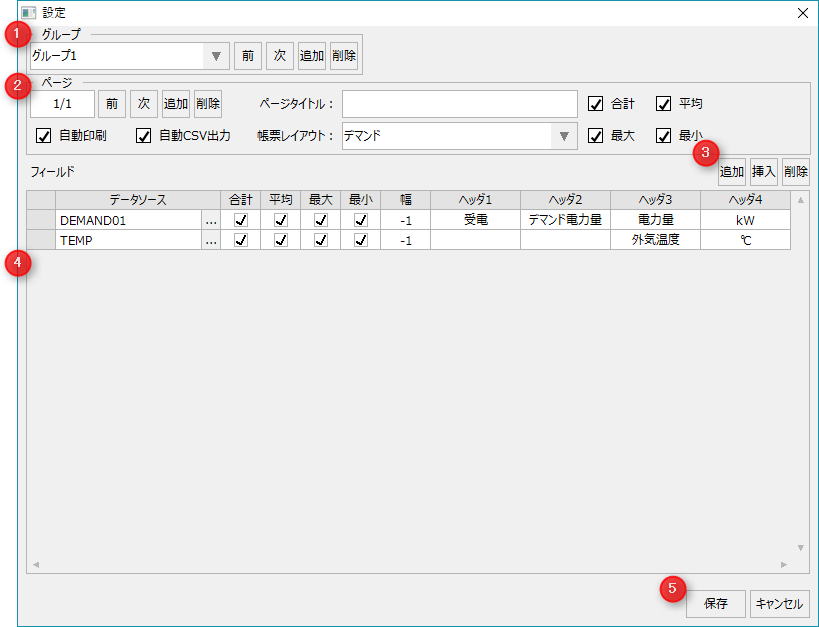
Page Operations
|
Previous/Next
|
Switches the registered page.
|
Add a page
|
Add a page. There is no limit to the number of pages that can be set in one report group.
|
Delete page
|
Delete the page.
|
Automatic printing
|
Specifies whether the page is to be automatically printed. To automatically print, you must register PRINTREPORT in the Panel Server event.
The following Scheduled event is set in the sample. For details about the format of the execution parameters, see "Event Settings" in the Summary Action Reference.
Scheduled event name
|
Default setting date and time
|
Action execution parameters
|
PRINTREPORT_DAY
|
Everyday at 00:05
|
PRINTREPORT(reportmaster.csv,DAY,
DAY-1D,DAY,-1,-1,,F,0,F,1)
|
PRINTREPORT_MONTH
|
00:06 on the first day of every month
|
PRINTREPORT(reportmaster.csv,MONTH,
MONTH-1MO,MONTH,-1,-1,,F,0,F,1)
|
PRINTREPORT_YEAR
|
Every year at 00:07 on January 1st
|
PRINTREPORT(reportmaster.csv,YEAR,
YEAR-1Y,YEAR,-1,-1,,F,0,F,1)
|
|
Automatic CSV output
|
Specifies whether the page is to be automatically output to CSV. To print automatically, you must register CREATESUBREPORT in the Panel Server event.
The following Scheduled event is set in the sample. For details about the format of the execution parameters, see "Event Settings" in the Summary Action Reference.
Scheduled event name
|
Default setting date and time
|
Action execution parameters
|
CREATECSV_DAY
|
Everyday at 00:10
|
CREATESUBREPORT(reportmaster.csv,csv_header2,
CSV\DAY\DAYSUB_[GROUPID2]_[PAGEID2]_%Y%m%d.csv,
DAY,DAY-1D,DAY,-1,-1,0,F,2)
|
CREATECSV_MONTH
|
1st of every month at 00:11
|
CREATESUBREPORT(reportmaster.csv,csv_header2,
CSV\MONTH\MONTHSUB_[GROUPID]_[PAGEID]_%Y%m%d.csv,
MONTH,MONTH-1MO,MONTH,-1,-1,0,F,2)
|
CREATECSV_YEAR
|
Every year at 00:12 on January 1st
|
CREATESUBREPORT(reportmaster.csv,csv_header2,
CSV\YEAR\YEARSUB_[GROUPID]_[PAGEID]_%Y%m%d.csv,
YEAR,YEAR-1Y,YEAR,-1,-1,0,F,2)
|
|
Page Title
|
Sets the title of the page.
|
Form Layout
|
Specifies the page layout. The layouts that can be specified are set in the "_LayoutType" custom property.
|
Aggregate value
|
Select the aggregate values you want to include on the page.
|
|