Availability Monitoring Custom Properties
The custom properties of this screen library are as follows:
Basic |
Keep your settings |
_IsSaveDisp |
default:True
Specifies whether the screen state is preserved.
|
||||||||
Show Settings button |
_IsConfig |
default:True
Specifies whether to show or hide the settings button.
|
|||||||||
Shows the selected group |
_GroupEnable |
default:True
This will be used as the default value for "Hide the following groups" on the facility registration screen.
|
|||||||||
Monitor display frame basic settings |
Maximum number of display lines for equipment |
_AndonMaxRow
|
default:10
Set the upper limit of the total number of rows that can be set in the Layout tab of the Operation Status Monitor Settings screen.
|
||||||||
Maximum number of display columns for equipment |
_AndonMaxCol
|
default:10
Set the upper limit for the total number of columns that can be set on the Layout tab of the Operation Status Monitor Settings screen.
|
|||||||||
Number of lines to display equipment |
_AndonRow
|
default:3
Set the initial number of total rows to be displayed on the Layout tab of the Operation Status Monitor Settings screen.
|
|||||||||
Number of columns for displaying equipment |
_AndonCol
|
default:3
Set the initial number of total columns to be displayed on the Layout tab of the Operation Status Monitor Settings screen.
|
|||||||||
Monitor display settings |
Merge Column Count |
_AndonWidth
|
default:1
Set the initial number of merge columns to be displayed on the Layout tab of the Operation Status Monitor Settings screen.
|
||||||||
Merge Row Count |
_AndonHeight
|
default:1
Set the initial number of merge rows to be displayed on the Layout tab of the Operation Status Monitor Settings screen.
|
|||||||||
Monitor title display |
_AndonTitleVisible
|
default:True
Set the initial value for whether or not to display the title on the Design tab of the Operation Status Monitor Settings screen.
|
|||||||||
Monitor title top justification |
_AndonTitleHideArea
|
default:False
Set the initial value for justifying the top of the title displayed in the Design tab of the Operation Status Monitor Settings screen.
|
|||||||||
Monitor Title Font |
_AndonTitleFont
|
default:Meiryo UI (14)
Set the initial font for the title displayed on the Design tab of the Operation Status Monitor Settings screen.
|
|||||||||
Monitor subtitle display |
_AndonSubTitleVisible
|
default:True
Set the initial value for whether or not to display the subtitle on the Design tab of the Operation Status Monitor Settings screen.
|
|||||||||
Monitor subtitle top justification |
_AndonSubTitleHideArea
|
default:False
Set the initial value for the top justification of the subtitle displayed in the Design tab of the Operation Status Monitor setting screen.
|
|||||||||
Monitor Subtitle Font |
_AndonSubTitleFont
|
default:Meiryo UI (12)
Set the initial font for the subtitle displayed on the Design tab of the Operation Status Monitor Settings screen.
|
|||||||||
Number of monitor left lamps |
_LampNum
|
default:3
Set the initial number of left lamps to be displayed on the Design tab of the Operation Status Monitor Settings screen.
|
|||||||||
Left justification of the left lamp on the monitor |
_LampHideArea
|
default:False
Set the initial value for the left justification of the left lamp displayed on the Design tab of the Operation Status Monitor setting screen.
|
|||||||||
Data display line |
_AndonDisplayRow
|
default:3
Set the initial number of rows in the data display layout to be displayed on the Design tab of the Operation Status Monitor Settings screen.
|
|||||||||
Data Display Column |
_AndonDisplayCol
|
default:2
Set the initial number of columns for the data display layout displayed on the Design tab of the Operation Status Monitor Settings screen.
|
|||||||||
How to display data |
_AndonDisplayType
|
default:0(Full)
Set the initial value for the data display method to be displayed on the Design tab of the Operation Status Monitor Settings screen.
|
|||||||||
How to display messages |
_AndonMsgDisplayType
|
default:0(Full)
Set the initial value for the message display method to be displayed on the Design tab of the Operation Status Monitor Settings screen.
|
|||||||||
Enable Stretch (Auto Fit) |
_AndonAutoSizeAdjust
|
default:True
Set the initial value for "Enable stretch" which is displayed in the detailed settings of the Design tab on the Operation Status Monitor settings screen.
|
|||||||||
Data display upper margin |
_AndonMarginTop
|
default:4
Similarly, set the initial value for the top margin, which is displayed in the design details settings.
|
|||||||||
Data display left margin |
_AndonMarginLeft
|
default:4
Similarly, set the initial value for the left margin, which is displayed in the design details settings.
|
|||||||||
Data Display Label Width |
_AndonLabelWidth
|
default:60
Similarly, set the initial value for the label width, which is displayed in the design details settings.
|
|||||||||
Data display range |
_AndonValueWidth
|
default:40
Similarly, you can set the initial value display width in the design details settings.
|
|||||||||
Data display unit width |
_AndonUnitWidth
|
default:22
Similarly, you can set the initial value for the unit display width, which is displayed in the design details settings.
|
|||||||||
Data display line height |
_AndonRowHeight
|
default:24
Similarly, you can set the initial row height for data display in the design details settings.
|
|||||||||
Data Display Label Text Font |
_AndonLabelFont
|
default:Meiryo UI (11)
Set the initial value of the label font displayed in the detailed settings of the Display Data tab on the Operation Status Monitor Settings screen.
|
|||||||||
Data Label Text Color |
_AndonLabelTextColor
|
default:#000000
Similarly, you can set the initial value for the label display color in the detailed display data settings.
|
|||||||||
Data display label text horizontal position |
_AndonLabelTextAlignX
|
default:LEFT
Similarly, you can set the initial horizontal position of the label in the detailed display data settings. Choose from "LEFT", "CENTER", or "RIGHT".
|
|||||||||
Data display label text vertical position |
_AndonLabelTextAlignY
|
default:CENTER
Similarly, you can set the initial vertical position of the label in the detailed display data settings. Choose from "TOP", "CENTER", or "BOTTOM".
|
|||||||||
Data display value text font |
_AndonValueFont
|
default:Meiryo UI (11)
Set the initial value for the font of the value displayed in the detailed settings of the Display Data tab on the Operation Status Monitor Settings screen.
|
|||||||||
Data display value text color |
_AndonValueTextColor
|
default:#000000
Similarly, you can set the initial display color for values displayed in the detailed display data settings.
|
|||||||||
Data display value text horizontal position |
_AndonValueTextAlignX
|
default:LEFT
Similarly, you can set the initial horizontal position of the value to be displayed in the detailed display data settings. Choose from "LEFT", "CENTER", or "RIGHT".
|
|||||||||
Data display value text vertical position |
_AndonValueTextAlignY
|
default:CENTER
Similarly, you can set the initial vertical position of the value to be displayed in the detailed display data settings. Choose from "TOP", "CENTER", or "BOTTOM".
|
|||||||||
Data display unit text font |
_AndonUnitFont
|
default:Meiryo UI (9)
Set the initial value of the font for units displayed in the detailed settings of the Display Data tab on the Operation Status Monitor Settings screen.
|
|||||||||
Data display unit text color |
_AndonUnitTextColor
|
default:#000000
Similarly, you can set the initial value for the display color of the units displayed in the detailed display data settings.
|
|||||||||
Data display unit text horizontal position |
_AndonUnitTextAlignX
|
default:RIGHT
Similarly, you can set the initial value for the horizontal position of the units to be displayed in the detailed display data settings. Choose from "LEFT", "CENTER", or "RIGHT".
|
|||||||||
Data display unit text vertical position |
_AndonUnitTextAlignY
|
default:BOTTOM
Similarly, you can set the initial vertical position of the units to be displayed in the detailed display data settings. Choose from "TOP", "CENTER", or "BOTTOM".
|
|||||||||
Display panel background color |
_AndonFillColorRun
|
default:#00B3B3
On the detailed settings screen for operation status collection, set the initial value for the display panel background color (the fill color of the equipment display frame) when "Operation" is selected for the aggregation classification.
|
|||||||||
_AndonFillColorStop
|
default:#FFE699
Similarly, set the initial value for the display panel background color when "Operation suspension" is selected as the aggregation classification.
|
||||||||||
_AndonFillColorAlarm
|
default:#FFC1C1
Similarly, set the initial value for the display panel background color when "Abnormal" is selected for the aggregation classification.
|
||||||||||
_AndonFillColorEtc
|
default:#DEEBF7
Similarly, set the initial value for the display panel background color when "Other" is selected as the aggregation classification.
|
||||||||||
Display panel text color |
_AndonTextColorRun
|
default:#FFFFFF
On the detailed settings screen for operation status collection settings, you can set the initial value for the display panel text color (text color of the equipment name and other information displayed in the equipment display frame) when "Operation" is selected for the aggregation classification.
|
|||||||||
_AndonTextColorStop
|
default:#000000
Similarly, set the initial color of the text on the display panel when "Stopped" is selected as the aggregation classification.
|
||||||||||
_AndonTextColorAlarm
|
default:#000000
Similarly, set the initial color of the display panel text when "Abnormal" is selected as the aggregation classification.
|
||||||||||
_AndonTextColorEtc
|
default:#000000
Similarly, set the initial value for the display panel text color when "Other" is selected as the aggregation classification.
|
||||||||||
Enable Left Lamp Display |
_LampEnableRun
|
default:True
On the detailed settings screen for operation status collection settings, when "Operation" is selected as the aggregation classification, set the initial value for "Enable lamp display" for the left lamp.
|
|||||||||
_LampEnableStop
|
default:True
Similarly, set the initial value for "Enable lamp display" for the left lamp when "Stopped" is selected as the aggregation classification.
|
||||||||||
_LampEnableAlarm
|
default:True
Similarly, set the initial value for "Enable lamp display" for the left lamp when "Abnormal" is selected for the aggregation classification.
|
||||||||||
_LampEnableEtc
|
default:True
Similarly, set the initial value for "Enable lamp display" for the left lamp when "Other" is selected as the aggregation classification.
|
||||||||||
Left lamp display position |
_LampPosRun
|
default:3
On the detailed settings screen for operation status collection, when "Operation" is selected for the aggregation classification, set the initial value for the display position of the left lamp.
|
|||||||||
_LampPosStop
|
default:2
Similarly, set the initial value for the display position of the left lamp when "Stopped" is selected as the aggregation classification.
|
||||||||||
_LampPosAlarm
|
default:1
Similarly, set the initial value for the display position of the left lamp when "Abnormal" is selected for the aggregation classification.
|
||||||||||
_LampPosEtc
|
default:4
Similarly, set the initial value for the display position of the left lamp when "Other" is selected as the aggregation classification.
|
||||||||||
Left lamp color |
_LampColorRun
|
default:#05FD02
On the detailed settings screen for operation status collection, when "Operation" is selected for the aggregation classification, set the initial display color of the left lamp.
|
|||||||||
_LampColorStop
|
default:#FEFF01
Similarly, set the initial color of the left lamp when "Stopped" is selected as the aggregation classification.
|
||||||||||
_LampColorAlarm
|
default:500;#FD2100;#800000
Similarly, set the initial color of the left lamp when "Abnormal" is selected for the aggregation classification.
|
||||||||||
_LampColorEtc
|
default:#33FFFF
Similarly, set the initial color of the left lamp when "Other" is selected as the aggregation classification.
|
||||||||||
Enable message display |
_StatusEnableRun
|
default:False
On the detailed settings screen for operation status collection settings, set the initial value of "Enable display" for message display when "Operation" is selected for aggregation classification.
|
|||||||||
_StatusEnableStop
|
default:False
Similarly, set the initial value for "Enable display" for the message display when "Stopped" is selected as the aggregation classification.
|
||||||||||
_StatusEnableAlarm
|
default:False
Similarly, set the initial value for "Enable display" for message display when "Abnormal" is selected for the aggregation classification.
|
||||||||||
_StatusEnableEtc
|
default:False
Similarly, set the initial value for "Enable display" for the message display when "Other" is selected as the aggregation classification.
|
||||||||||
Message display color |
_StatusFillColorRun
|
default:#23AC0E
On the detailed settings screen for operation status collection, when "Operation" is selected as the aggregation classification, set the initial fill color for the message display.
|
|||||||||
_StatusFillColorStop
|
default:#FFC000
Similarly, set the initial fill color for the message display when "Stopped" is selected as the aggregation classification.
|
||||||||||
_StatusFillColorAlarm
|
default:500;#FF0000;#800000
Similarly, set the initial fill color for the message display when "Abnormal" is selected for the aggregation classification.
|
||||||||||
_StatusFillColorEtc
|
default:#5B9BD5
Similarly, set the initial fill color for the message display when "Other" is selected as the aggregation classification.
|
||||||||||
Message display text color |
_StatusTextColorRun
|
default:#FFFFFF
On the detailed settings screen for operation status collection, when "Operation" is selected as the aggregation classification, set the initial text color for message display.
|
|||||||||
_StatusTextColorStop
|
default:#FFFFFF
Similarly, set the initial text color for the message display when "Stopped" is selected as the aggregation classification.
|
||||||||||
_StatusTextColorAlarm
|
default:#FFFFFF
Similarly, set the initial text color for the message display when "Abnormal" is selected for the aggregation classification.
|
||||||||||
_StatusTextColorEtc
|
default:#FFFFFF
Similarly, set the initial text color for the message display when "Other" is selected as the aggregation classification.
|
||||||||||
Collection Settings |
Priority |
_PriorityRun
|
default:100
On the Operation Status Collection Settings screen, set the initial priority when "Operation" is selected for the aggregation classification.
|
||||||||
_PriorityStop
|
default:50
Similarly, set the initial priority when "Suspended" is selected as the aggregation classification.
|
||||||||||
_PriorityAlarm
|
default:10
Similarly, set the initial priority when "Abnormal" is selected for the aggregation classification.
|
||||||||||
_PriorityEtc
|
default:100
Similarly, set the initial priority when "Other" is selected as the aggregation classification.
|
||||||||||
Tags/Conditions |
_DefaultTagRun
|
default:Not specified
On the operation status collection settings screen, set the initial value to be displayed in the tag/condition expression when "Operation" is selected for the aggregation classification.
|
|||||||||
_DefaultTagStop
|
default:Not specified
Similarly, set the initial value to be displayed in the tag/conditional expression when "Stopped" is selected as the aggregation classification.
|
||||||||||
_DefaultTagAlarm
|
default:Not specified
Similarly, set the initial value to be displayed in the tag/conditional expression when "Abnormal" is selected for the aggregation classification.
|
||||||||||
_DefaultTagEtc
|
default:Not specified
Similarly, set the initial value to be displayed in the tag/conditional expression when "Other" is selected as the aggregation classification.
|
||||||||||
Classification Color |
_ColorRun
|
default:#23AC0E
Set the display color for the aggregation classification "Operation" in graph displays such as the timeline and operation analysis screens.
|
|||||||||
_ColorStop
|
default:#FFC000
Similarly, set the display color for the aggregation classification "Operation down."
|
||||||||||
_ColorAlarm
|
default:#FF0000
Similarly, set the display color for the aggregation classification "Abnormal."
|
||||||||||
_ColorEtc
|
default:#001AFF
Similarly, set the display color for the aggregation classification "Other."
|
||||||||||
Color scheme |
_PaletteRun
|
default:#009F8C,#40BFB0,#95DFD6,#5EC84E,#A6E39D
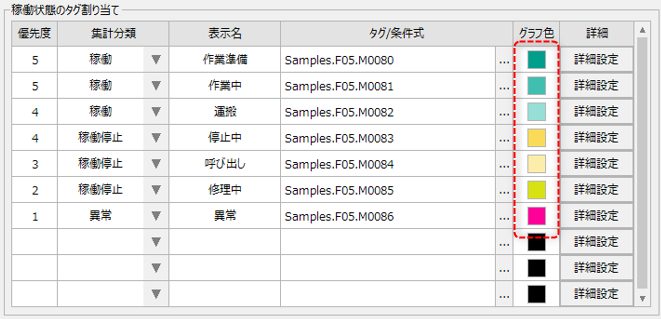
When "Operation" is selected for the aggregation classification on the operation status collection setting screen, specify the initial values to be displayed in the graph color by listing them separated by commas. This setting value will be used as the initial value of the graph color displayed in the following parts of the setting screen.
|
|||||||||
_PaletteStop
|
default:#F9DB57,#FCEDAA,#D8E212,#E4EC5B,#F2F5AA
Similarly, when "Stopped" is selected as the aggregation classification, specify the initial values to be displayed in the graph colors by listing them separated by commas.
|
||||||||||
_PaletteAlarm
|
default:#FF0099,#FF99D6,#FFCCEB,#FF9999,#FFCCCC
Similarly, when "Abnormal" is selected for the aggregation classification, specify the initial values to be displayed in the graph colors by listing them separated by commas.
|
||||||||||
_PaletteEtc
|
default:#99A3FF,#CCD1FF,#00B3FF,#99E0FF,#CCF0FF
Similarly, when "Other" is selected as the aggregation category, specify the initial values to be displayed in the graph colors by listing them separated by commas.
|
||||||||||
Number Format |
Common comma separated |
_DigitSeparator
|
default:False
The initial value for whether or not to separate numeric values with commas.
|
||||||||
Percentage decimal places |
_PercentDecimal
|
default:0
The initial number of decimal places for "%" display.
|
|||||||||
Number of decimal places for minutes |
_MinuteDecimal
|
default:0
The initial number of decimal places for the minutes display.
|
|||||||||
Number of decimal places for production display |
_ProductDecimal
|
default:0
The initial number of decimal places for "Target", "Results", and "Variance".
|
|||||||||
Number of decimal points on monitor display |
_MonitorDecimal
|
default:0
The initial number of decimal points when "Monitor" is displayed in the display data on the operation status monitor screen.
|
|||||||||
Multilingual Settings |
Date and Time Format Name |
_DateTimeFormat
|
default:@DATETIME
Date display format. For details on date and time formats, see "Date and Time Formats" in the Appendix.
|
||||||||
Number Format Name |
_NumberFormat
|
default:@NUMBER
Number display format. For information on number formats, see "Number Format" in the Appendix.
|