Setup process overview
Client applications created with Panel Editor must be deployed in the production environment by running a "setup process."
The setup process is one of the build tasks, and can be called and executed from the "Setup function" of Panel Editor. By executing the setup process, the paths of image files and setting files defined as absolute paths from part libraries and various properties can be converted to relative paths in one go, and various externally referenced files can be copied in one go to the resource folder, generating distribution files. When building an actual device environment, all you need to do is copy the distribution files generated by the setup folder and place them on the target PC.
There are several methods for running the client at runtime, and depending on which method you use, you will need to perform the setup process for each method. For details on how to perform the setup process for each method, please refer to the respective descriptions in "Runtime Execution of the Client".
|
If you are not using image files, do not use direct login, or do not use Internet Explorer, you do not necessarily need to run the setup process. In that case, you can copy the configuration file (xml) to any location on the actual PC and open it in Panel Browser to run it. However, since part libraries and the like may use image files internally, if you encounter problems such as image files not being displayed correctly in the execution environment, use the setup function to place them appropriately. |

|
The setup function of Panel Editor is only performed on the client configuration file. The setup process does not include the configuration file of Panel Server. It is recommended that you set the path of the file or folder to be set in the action of Panel Server as a relative path in advance. |

|
The setup function may not work properly due to the Windows permission settings. In such a case, you can run the setup function properly by starting Panel Editor as an administrator. |
How to call up the setup function
The client setup process can be performed using the setup function of Panel Browser.
To access the setup function, click on the following icon (red arrow) at the top of the Panel Browser screen.

The following "Create files for distribution to clients" dialog will then be displayed. The setup process is carried out from this dialog.
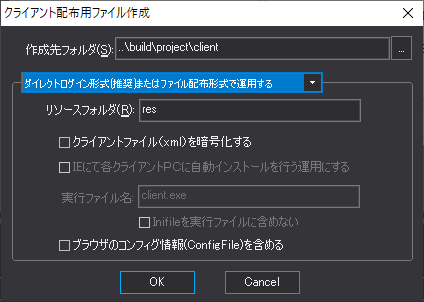
The setup process differs depending on the client runtime execution method. For details, please refer to each description in "Client runtime execution".
Setup feature related properties
Among the root properties, there are several properties available for setting the initial values of the setup functions of Panel Editor.
These parameters can be changed each time from the setup function screen, but by saving the setting values in the properties of the client setting file during development, they will be displayed as the initial values in the above dialog. For example, even if the PC used for development changes, you will be able to perform setup using the same parameters.
The procedure for setting properties related to the setup function is as follows:
1.Displays the client configuration file being created in Panel Editor.
2.View the properties of the route and set the following properties:
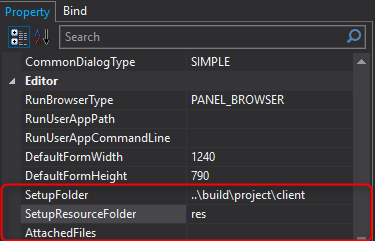
Route Property Name |
explanation |
SetupFolder
|
Specify the folder to be output by the setup function. Specify the relative path from the client configuration file currently being created. |
SetupResouceFolder
|
Specifies the name of the folder where the setup function's resources are output. When setup is run, a subfolder with the name specified in this property will be created directly under the folder specified in SetupFolder. For example, all image files to be displayed in Image control will be copied into the subfolder, and the property settings that were set using absolute paths will be replaced with relative paths to refer to the contents of the resource folder. |
AttachedFiles
|
In the setup function, files that have properties specified are automatically copied into the setup folder, but individual files that are not set in the properties (for example, text files prepared in advance to be read from a script) are not processed. In such cases, you can specify the file names to be included in the setup process in this property. If you want to specify multiple files, specify each file on multiple lines. |