Server runtime executable
In FA-Panel, configuration work for server functions is performed in Panel Server. Server function configuration work includes communication settings with PLC, tag registration, action and event settings, etc. The configuration values for Panel Server are saved in the "server configuration file," and runtime execution of server functions during operation is performed by running Panel Server online.
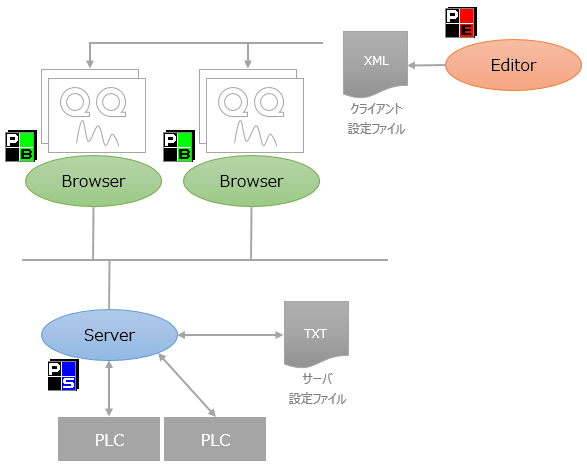
For actual operation, place the entire project folder created during development on the actual PC that will run Panel Server and run Panel Server online.
There are several ways to run
Panel Server at runtime:
Server runtime execution format |
|||||||||
|---|---|---|---|---|---|---|---|---|---|
Manual Runtime Execution |
The meaning of each icon is as follows, from left to right:
This method is mainly used for manual execution during the development and testing stages. In most cases, server functions should be executed automatically after the start of production operations, and execution is generally performed using the "Runtime execution with automatic startup settings" below.
|
||||||||
By auto-start setting Runtime Execution
|
By setting Panel Server to start automatically, you can run the runtime automatically when Panel Server starts. For details on the automatic startup setting, see "Automatic startup of Panel Server". |
||||||||