overview
Fields that can be defined in an alarm master include the recovery condition, occurrence wait timer, and recovery wait timer.
By defining these fields, you can individually define the recovery conditions for alarm occurrences and set the waiting time when an alarm occurs and when it is recovered.
This section introduces a customization example for the standard alarm function, where recovery conditions, an occurrence wait timer, and a recovery wait timer are set.
Fields related to this matter (excerpt)
item |
Field Name |
Commentary |
Conditions
|
[ONCONDITION] |
Describes the alarm condition. When the condition becomes TRUE, the alarm will occur. |
Return Condition
|
[OFFCONDITION] |
You can write the alarm recovery condition. The alarm will be recovered when the condition specified here becomes FALSE. If omitted, it will be considered to be recovered when the condition in the "occurrence condition" above becomes FALSE. |
Occurrence waiting timer
|
[ONTIMER] |
This is the timer until an alarm occurs (in seconds). If the value remains TRUE for the specified time, an alarm will occur. |
Recovery wait timer
|
[OFFTIMER] |
This is the timer until the alarm is reset (in seconds). If the value remains FALSE for the specified time, the alarm is reset. |
Download the sample
The creation examples shown on this page are provided with samples.
The sample can be downloaded from below.
Procedure
■Editing the alarm master
1.Open Alarm Master
Open "master.csv" in the following folder of the target project.
(Project folder)\server\alarm\master.csv
Below is an example of an alarm master before the change.
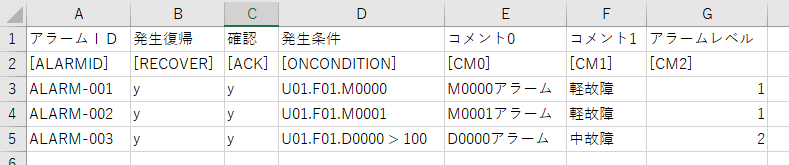
2.Editing an Alarm Master
For the above, after the occurrence condition ([ONCONDITION]), insert new columns for the recovery condition ([OFFCONDITION]), occurrence wait timer ([ONTIMER]), and recovery wait timer ([OFFTIMER]), and set the conditions. Here, edit as follows.

When editing the alarm master in Excel, save it in CSV format.
Below is an example edited in Notepad.
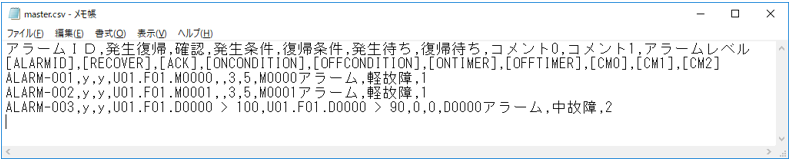
To summarize the edits above:
M0000...OFFCONDITION: None, waiting for occurrence: 3 seconds, waiting for recovery: 5 seconds
M0001...OFFCONDITION: None, waiting for occurrence: 3 seconds, waiting for recovery: 5 seconds
D0000...OFFCONDITION: 90 or less to recover, waiting for occurrence: 0 seconds, waiting for recovery: 0 seconds
The return conditions are:When the condition expression you entered becomes FALSE, the alarm is considered to have been reset.Please note that this is not interpreted as when the conditional expression is true (when it becomes TRUE).
Operation check
Now let's check how it works.
Click Online (yellow arrow) at the top of the Panel Server screen.
Next, click the browser run icon (green arrow) at the top of the Panel Editor screen to call up Panel Browser.
Once Panel Browser is running, display the alarm summary screen.
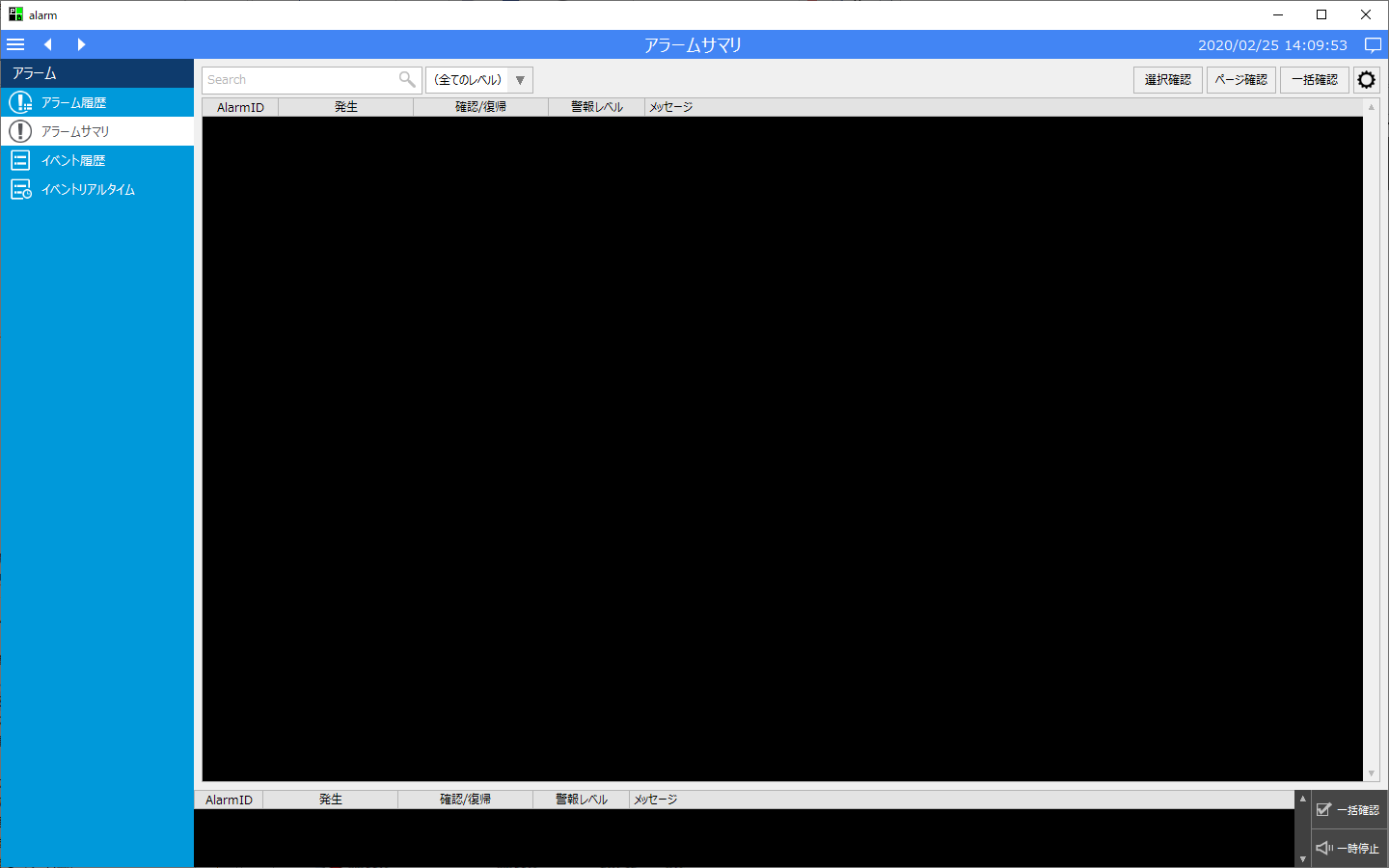
First, check the operation of the occurrence wait timer and recovery wait timer.
Please write TRUE to U01.F01.M0000 from Panel Server.

Please confirm that the alarm occurs 3 seconds after writing TRUE to the tag by setting the occurrence waiting timer.

Next, write FALSE to U01.F01.M0000 from Panel Server.

Then, due to the recovery timer setting, the alarm will be restored 5 seconds after the tag is set back to FALSE.

In this way, by specifying the alarm occurrence wait timer and recovery wait timer, you can include in the judgment whether the occurrence condition or recovery condition continues for the specified time (in seconds).
Next, check the operation of the return conditions.
Please write a number greater than 100 to U01.F01.D0000 from Panel Server.

The alarm occurrence condition for D0000 (greater than 100) was met, and the occurrence waiting timer was set to 0, so the alarm occurred immediately.

Next, try writing 95 from Panel Server to U01.F01.D0000.

The condition for alarm D0000 to occur (greater than 100) is no longer met, but the condition for recovery (90 or less) has not been met, so the alarm will not be restored yet.

Next, try writing 90 from Panel Server to U01.F01.D0000.

The alarm was then reset because the alarm reset condition (90 or less) was met.

In this way, by specifying the alarm recovery conditions, you can set a range for the value at which the alarm is considered to have been recovered after it has occurred. For example, when monitoring the level of a liquid or other object numerically, you can use this to not consider the alarm to have been recovered until the level has fallen to a safe range.