overview
This section explains how to manually incorporate "Operation Monitoring" in the screen library.
If you want to add operation monitoring to a standard framework project later, or if you are building your own project and want to incorporate operation monitoring, please refer to this procedure.
|
The screen library comes with samples. You can open the samples from Panel Editor. For details on how to open the samples, please refer to "Screen Library Help / About Samples". |

Manually embedding the operation monitoring screen library
Below are the steps to manually incorporate "Operation Monitoring" in the screen library.
■ Work procedure
1.Select Screens Library from the Libraries tab
In Panel Editor, select the Library tab and set the type to "Screen Library".
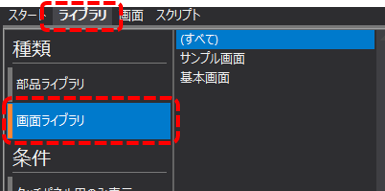
The display in the center of the screen will then switch to the library selection screen.
2.Import "Operation Monitoring" from the screen library
Select "Operation Monitoring" from the screen library list and drag and drop it onto "client.xml" in the project tree.
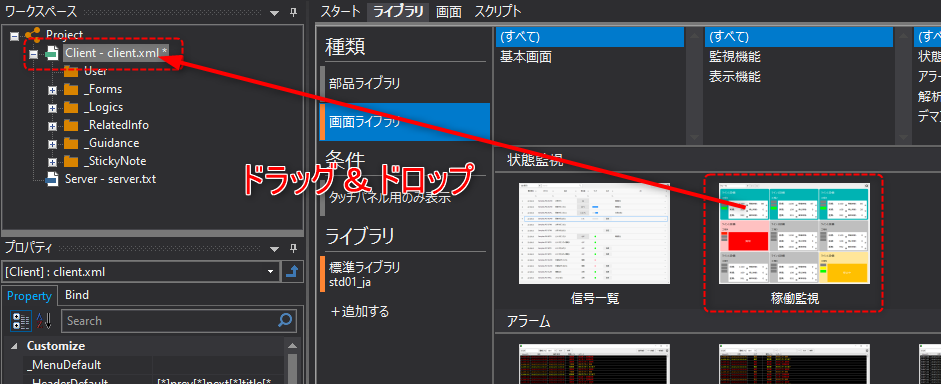
|
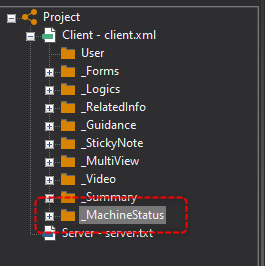
Then, a folder called "_MachineStatus" was created as shown on the left, and the entire set of forms required as a screen library was copied.
_MachineStatus - Complete operation monitoring screen
|
3.Describe the screen call process
After embedding a form from the screen library, implement the process to call the screen from the library.
There are several ways to call up screens from the Screen Library. For details on how to call up screens, please refer to "Calling Screens from the Screen Library" in the Screen Creation Guide.