What is operation monitoring?
Operation monitoring is a function that enables visualization of the operating status of machinery and equipment in factories, etc.
It is possible to collect operating status information (such as operation, shutdown, and abnormality) from machinery and equipment in factories, etc., and monitor the equipment's operating status, operating performance, production performance, etc.
(Operation status monitor screen)
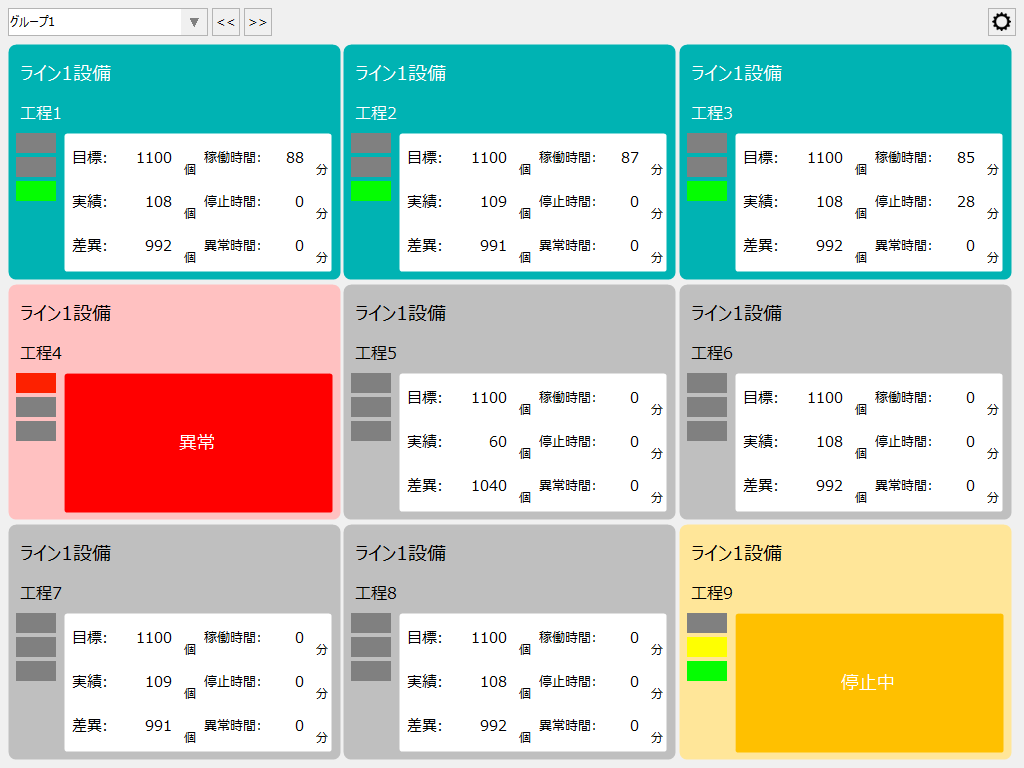
The operation monitoring function monitors and displays the operation status by collecting signals related to operation status such as operation, stop, and abnormality from control devices such as PLC and remote I/O via tags. In addition, a system has been built in which various calculations such as operation time, stop time, abnormality time, and operation count are automatically performed, and it is possible to display operation time and stop time for each piece of equipment as a Gantt chart, calculate the equipment operation rate, and display the progress of production results against production targets.
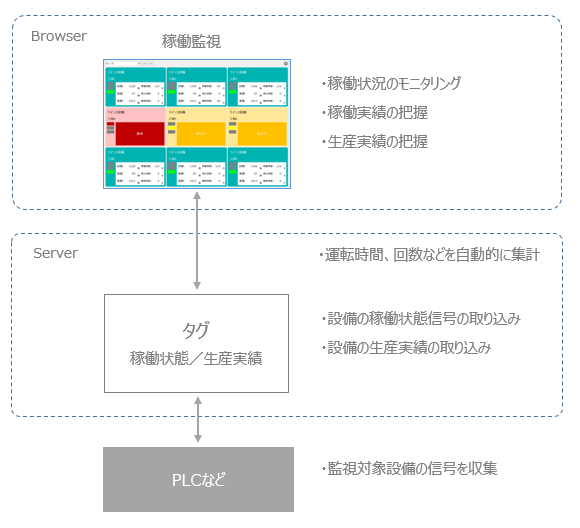
Standard specifications for operation monitoring
item |
Contents |
explanation |
Number of facilities that can be registered |
Initial setting: up to 30 devices (up to 100 devices can be added)
|
In the operation monitoring function, the management unit of monitored objects in the system is called "equipment." You can freely assign monitored objects in the real world to equipment in the system. For example, you can assign machine tools and other machinery used in production as "equipment" (operating or stopping each piece of equipment, etc.), or you can manage concepts such as production lines or production processes as equipment (operating or stopping the entire line, etc.). The number of registered facilities in the system is limited to 30 facilities by default (you can change the settings to increase this to a maximum of 100 facilities).
For information on how to think about equipment for operation monitoring, please see "What is equipment?".
|
Number of operation states that can be assigned to each piece of equipment |
Up to 10 types per facility |
You can assign the operating status you want to monitor to equipment registered in the system. An operating status is a tag or condition expression that indicates the status of the equipment, such as "operating," "stopped," "abnormal," "call," or "under repair." You can set up to 10 types of status for each piece of equipment.
For information on how to consider the operating status of equipment, please refer to "Collecting operating status".
|
Logging Cycle |
1 second period |
The operating status of the equipment is configured to be automatically logged. The logging cycle is set to 1 second.
|
Aggregation process cycle
|
1 minute cycle |
Based on the above logging data, data is collected at one-minute intervals. The data collection process automatically collects the ON time, ON count, and other data for each classification to which the operating status belongs.
|