overview
This section explains the concept of "equipment" in FA-Panel operation monitoring, and matters related to the collection, aggregation, and classification of operation status.
•Regarding the classification of operational status
•Collecting production records
In the operation monitoring function, the management unit of monitored objects in the system is called "equipment."
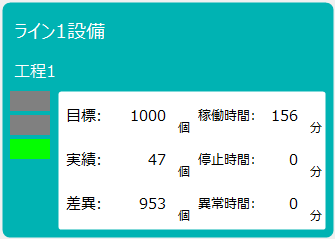
You can freely assign real-world monitoring targets to equipment in the system. For example, you can assign machine tools and other machinery used in production as equipment (operating or stopping each piece of equipment, etc.), or you can manage concepts such as production lines or production processes as equipment (operating or stopping the entire line, etc.). Equipment can be registered from the operation monitoring settings registration screen. Information about equipment registered in the system can be used from various screens. For example, on the operation status monitor screen, one piece of equipment is assigned to one display frame.
(Display frame for operation status monitor)
■ Maximum number of devices that can be registered
The maximum number of pieces of equipment that can be registered in the operation monitoring function is 30 as standard.
■ About facility ID
The operation monitoring function provides areas for 30 pieces of equipment in advance as areas for managing equipment information. A consecutive number starting from 1 is assigned to each equipment area, and this number is called an "equipment ID." When registering equipment information from the settings screen, you must assign an equipment ID to the equipment.
|
There are some important points to note when changing the settings of equipment registration information (equipment ID, status ID, aggregation classification, etc.) after starting operation of operation monitoring. For details, please refer to "(Important) Notes on changing settings after starting operation". |

|
The number of facilities that can be registered is limited to 30 in the standard settings, but this limit can be increased up to 100. How to increase the limit on the number of facilities is described in "Increasing the limit on the number of facilities" in Customizing operation monitoring. |

An operating status refers to the state of equipment, such as "operating," "stopped," "abnormal," or "on call."
The operation monitoring function collects the operation status of equipment via tags from PLC, remote I/O, etc. By assigning tags and conditional expressions that serve as detection conditions for the operation status of equipment, the system automatically logs and tallies the ON time, number of ON times, etc. for each operation status.
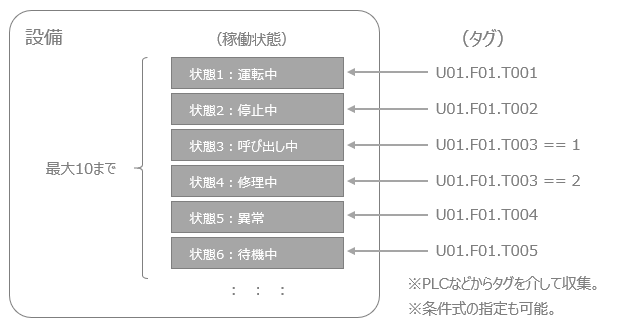
Furthermore, up to 10 types of operating status can be registered for each piece of equipment.
■ About state ID
Within the operation monitoring function, 10 fixed areas are pre-allocated for each piece of equipment as areas for managing the equipment's operating status. These operating status areas are assigned consecutive numbers from 1 to 10, and these numbers are called "status IDs."
|
There are some important points to note when changing the settings of equipment registration information (equipment ID, status ID, aggregation classification, etc.) after starting operation of operation monitoring. For details, please refer to "(Important) Notes on changing settings after starting operation". |
About the classification of operation status
An important concept in time aggregation of operation status is the "aggregation classification." Aggregation classification consists of four types: "operation," "stopped operation," "abnormal," and "other," and each operation status assigned to equipment must belong to one of the classifications.
Below is an example of an aggregate classification assignment.
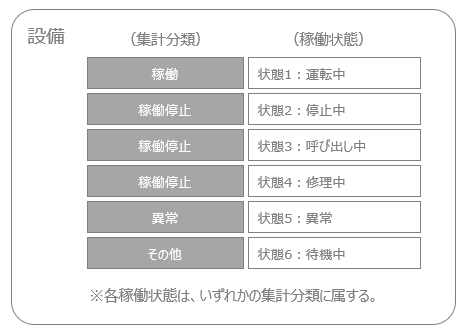
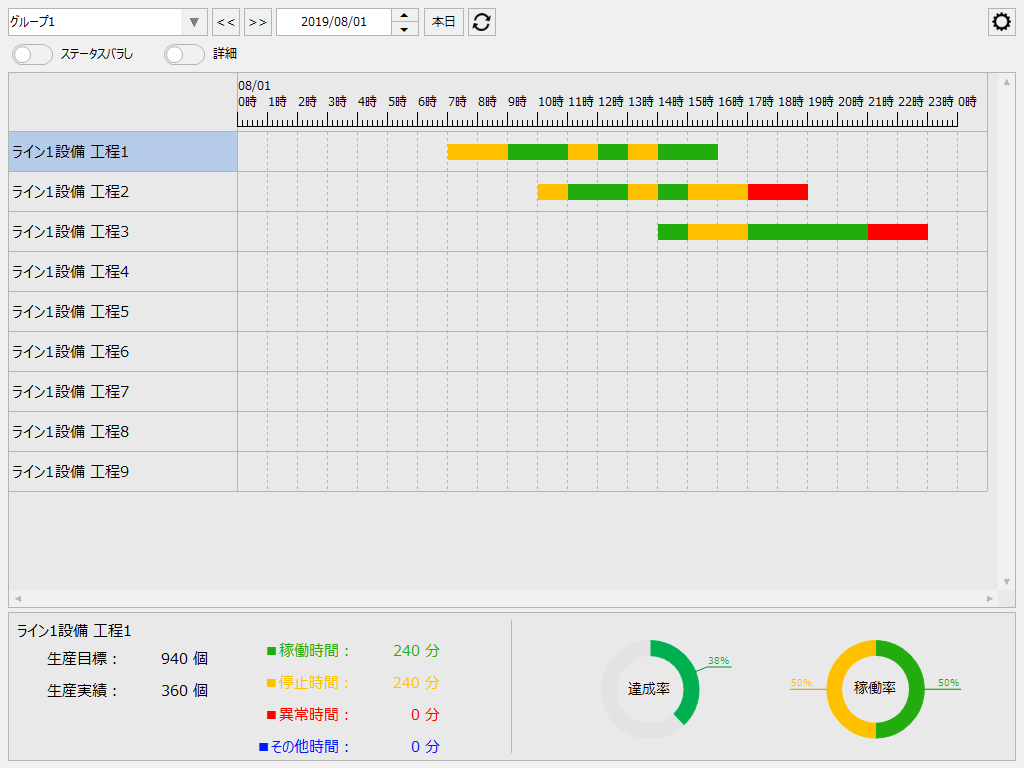
Aggregation classifications are used in various places. For example, in the time aggregation process of operation monitoring, aggregation is performed in aggregation classification units. The time aggregate values for aggregation classification units are used from each screen of the operation monitoring function. For example, in the Gantt chart display on the timeline screen, the data is color-coded according to the aggregation classification (operation time, downtime, abnormal time, other time).
(Example of a timeline screen)
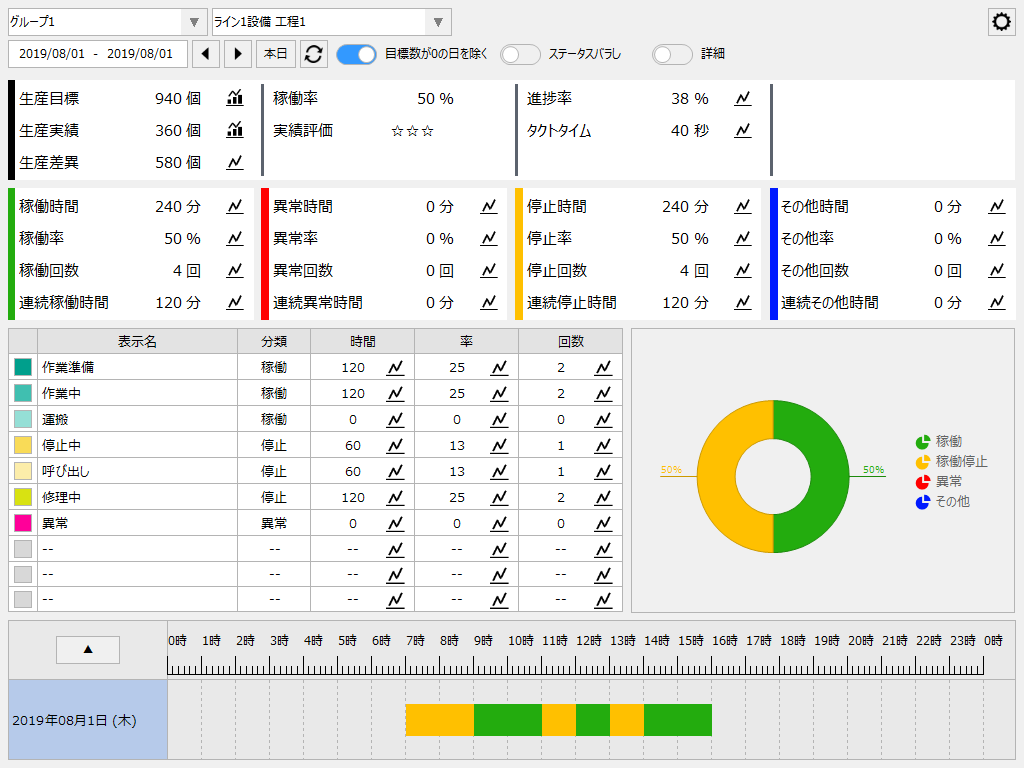
In addition, the operation analysis screen displays detailed data on operation time, abnormal time, stop time, and other time-related data.
(Example of operation analysis screen)
|
There are some important points to note when changing the settings of equipment registration information (equipment ID, status ID, aggregation classification, etc.) after starting operation of operation monitoring. For details, please refer to "(Important) Notes on changing settings after starting operation". |
Collection of production results
In addition to collecting operation status, you can also set up equipment to collect production results. Production results are the quantity of products actually produced by the equipment. Production results are also imported via tags from PLC or remote I/O.
There are two ways to import production results:
How to import |
overview |
||
Receive the number of production units counted by the downstream device
|
In this method, the daily production quantity is counted up by downstream devices such as PLCs and received as a numerical value via tags. Note that this method assumes that the downstream counter for the number of production units is automatically reset at an appropriate time, such as at the turn of the day.
|
||
Receive production triggers by pulse
|
With this method, a trigger signal is received to indicate that production has taken place, and the number of times the trigger condition is met is counted up using the operation monitoring function to determine the production quantity. A trigger signal here is a signal that turns ON for a certain period of time each time production takes place, such as a shot signal from a press or a completion signal from manufacturing equipment.
|
For details on how to set up the import of production results, please refer to "Production Results Settings".
|
It is not necessary to collect production records to perform operation monitoring. Simple monitoring can also be performed using only basic operation status such as equipment operation and shutdown. In "Practical Operation Monitoring", examples of system construction according to the purpose of implementation are introduced with concrete examples, including an example of simple operation monitoring. |