Operation monitoring configuration workflow
The diagram below shows the workflow for building an operation monitoring system.
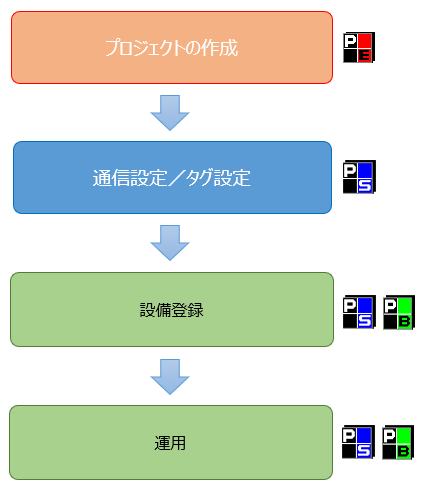
Below is a brief overview of each step:
procedure |
Applications |
overview |
Create a project
|
Panel Editor |
The operation monitoring function is provided as a complete screen library.
The easiest way to build an operation monitoring system is to use the wizard function from the start menu of Panel Editor to create a standard project that includes the operation monitoring function. The construction of a standard project is described in "Construction of a standard project for operation monitoring".
Alternatively, you can manually incorporate the operation monitoring screen library into an existing project. For information on how to manually incorporate operation monitoring, see "Manually incorporating the operation monitoring screen library".
|
Communication settings/tag registration
|
Panel Server |
Once you have created a project, you will need to configure Panel Server to import signals such as the operating status of the monitored equipment.
First, define a "unit" for connecting to control devices such as PLC. A unit is a communications driver for connecting and communicating with PLC etc., and you can select the desired PLC from the driver list on Panel Server and register it as a unit. Then, register a "tag" for the registered unit. A tag is a data space like a shared memory linked to a device address on PLC, and signals such as operation and stop of the target equipment are captured via the tag.
Specific methods for registering units and tags are described in "PLC communication settings and tag registration".
|
Facility registration settings
|
Panel Server Panel Browser
|
Once you have finished registering units and tags, you can perform equipment registration settings from the operation monitoring settings screen.
The setup work for equipment registration is done from the operation monitoring setup screen while Panel Server and Panel Browser are running online. On the setup screen, you register information about the equipment to be monitored, and assign the tags created in the tag registration to the target equipment. For example, the operating status of equipment 1 is U01.F01.T001, stopped is T002, abnormality is T003, etc. You set it up like you are linking the actual signal to the status you want to monitor.
Instructions on how to operate the operation monitoring settings screen are described in "Operation monitoring setting registration". In addition, "Practical Operation Monitoring" provides concrete examples of how to build a system according to the purpose of implementation.
|
Operation
|
Panel Server Panel Browser
|
In actual operation, Panel Server and Panel Browser are kept online and running at all times. When Panel Server is running online, it automatically collects various types of time such as operating hours and downtime, and saves daily report data. |