About tag registration
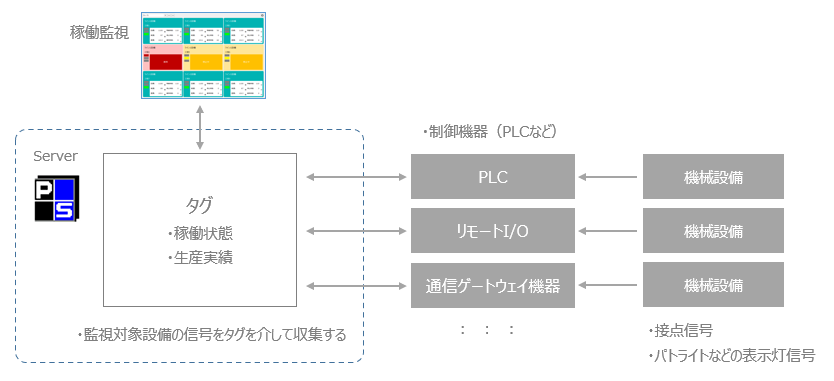
The operating status of equipment is collected via "tags" from devices such as PLC and remote I/O.
An operating state is, for example, the state of the equipment, such as "operating," "stopped," "abnormal," or "ringing." Configure equipment such as PLC to capture signals that indicate these states, and assign them to devices. Then, define a "unit" for Panel Server to connect to equipment such as PLC, and register a "tag" for the registered unit.
(Image of linking with equipment via tags)
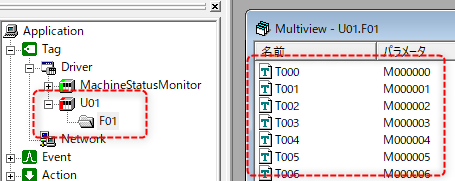
A unit is a communication driver for connecting to PLC etc., and you can select the desired device from the driver list in Panel Server. Also, a tag is like a variable linked to the device address on a device such as PLC, and you should create one tag for each signal point.
(Tag registration image for Panel Server)
For specific instructions on how to register units and tags, please refer to "PLC communication settings and tag registration".
(Reference) How to capture signals from monitored equipment
There are various ways to capture signals from equipment.
First, check whether the machinery you want to monitor has contacts for outputting its operating status as a signal. In some cases, the machinery has output contacts already installed, while in other cases, contact output can be added as an option to the machinery. If the machinery has contacts, it is possible to import data via the contact input of PLC or remote I/O, or it may be possible to import data via a communication gateway device equipped with a Modbus interface.
Below are some examples of specific import methods. Please use them as reference when building an actual system.
Example of how to import |
Contents |
remarks |
Import with PLC
|
If the target equipment has contacts for outputting signals indicating its operating status, these can be imported into the contact input of PLC. |
|
Importing via remote I/O
|
As above, the data can be imported via remote I/O contact input. |
|
Importing via a communication gateway device
|
The above contact information can also be imported via a communication gateway that supports the Modbus interface. |
|
Importing from indicator lights such as patrol lights (via communication gateway)
|
There are communication gateway devices that can receive signals such as the on/off status of indicator lights such as patrol lights. Signals can be received from these devices via Modbus. |
|
Importing via an external application
|
For devices that cannot be directly connected with our communication driver, you can connect via a third-party OPC server and import signals into our tags.You can also build your own external application that communicates with the target device and import signals into the tags on our server via the external application. |
Reference: "OPC Interface" Reference: "IPLink-Interface" |
|
When directly connecting to a device such as PLC, the device must be one of our communication drivers. For information on supported devices, please refer to the "Device Connection Guide". |
