Permissions policy definition

<< Click to Display Table of Contents >>

Manual > Monitoring system construction guide > Project creation > Standard project creation > Standard project user management (login) > Function explanation >

Permissions policy definition

Defining policy for user group permissions

The following policies are available for user group settings permissions:


In addition, graphic screens that users have added themselves can also be included as targets for access permission (whether or not to allow "screen display"). For information on how to set access permissions for your own graphic screens, see "Adding forms to user management access permissions".


subject

Policy name, etc.

explanation

system

System Settings


This is whether or not you can display the system settings screen. If you do not have permission to display system settings, you will not be able to select the system settings icon (gear icon) on the information bar, etc.


User Management


This is whether the "User Management" tab on the System Settings screen can be displayed. Users who do not have this authority cannot select the User Management tab on the System Settings screen.


(Summary area) Alarm confirmation


This is the permission to acknowledge alarms in the summary area of the standard framework. Users who do not have this permission will not be able to acknowledge alarms from the summary area when an alarm occurs.


(Summary area) Buzzer stopped


This is whether or not the buzzer can be stopped in the summary area of the standard framework. Users who do not have this privilege will not be able to stop the buzzer from the summary area when an alarm occurs.

Individual settings for each screen

Screen Display


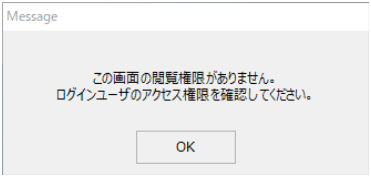
This is whether the target screen can be displayed. If a user without this authority attempts to display the target screen, the following message box will be displayed and the screen display will be canceled.


frame_111


Screen operation permissions


Set the permissions for various operations on the target screen.


subject

Policy Name

explanation

Signal List

Write operations

A write operation on a tag.

Alarm Summary

Confirmation Operation

This can be confirmed from the alarm summary screen.

Daily Report

Save edits

This is the operation to save the daily report.


Recount

This is a re-aggregation operation for daily reports.

Demand Monitoring

Monitoring

Monitoring can be started/stopped manually from the screen.


Alarm pause

This is a manual operation to pause the alarm from the screen.


Demand Cycle Reset

This is a manual operation to reset the demand cycle from the screen.


Maximum Demand Reset

This is the manual reset operation of the maximum demand value from the screen.

Demand Report

Save edits

This is the operation to save the modification of the demand report.


Recount

This is a demand report reaggregation operation.

Video Recorder

Recorder Operation

Recorder operation for the video recorder function.


Recording Operation

This is the recording operation of the video recorder function.


Settings operation authority


Set the permission to operate the settings on the target screen. Users without the permission cannot display the target setting screen.


subject

Policy Name

supplement

Guidance Function

Add/Delete

This authority is required to add and delete new guidance information.


GuidanceEdit

This permission is required to edit existing guidance information.

Signal List

Tag configuration

This is the permission to display the tag setting screen for defining what is displayed in the signal list.


List Settings

This permission allows the user to view the setting screens such as the layout definition of the signal list.

Operation monitoring

Setting registration

This is the authority to view the setting registration screen for operation monitoring equipment, collection target tags, etc.

Alarm History

Search number setting

This is a setting operation for the number of searches, etc.

Event History

Search number setting

This is a setting operation for the number of searches, etc.

Events in real time

setting

This is a setting operation for the number of searches, etc.

Trend Graph

Pen Settings

Permission to display the pen settings screen.

Comparative Trend Graph

Pen Settings

Permission to display the pen settings screen.

Scatter Plot Graph

Pen Settings

Permission to display the pen settings screen.

Energy Management

Points Registration

This is the authority to display the various energy management point registration screens.


Display settings

This is the permission to display the energy management display settings screen.


Period setting

This is the permission to display the period setting screen for energy management.

Daily Report

Points Registration

This is the authority to display the daily report point registration screen.

Demand Monitoring

Basic Settings

This is the right to view the basic settings screen for demand monitoring.


Advanced Settings

This is the right to display the detailed settings screen for demand monitoring.

Demand History

Measurement point registration

This is the permission to display the setting screen for measuring points to be displayed in the demand history.

Demand Report

Points Registration

This is the authority to display the point registration screen for the demand report.

Split View

Setting registration

This is the authority to register settings for the split display function.


Camera Registration

This is the authority to register cameras for the split display function.

Camera Monitor

Setting registration

This is the authority to register settings for the camera monitor (same function as split display).


Camera Registration

This is the authority to register cameras on the camera monitor (same function as split display).

Video Recorder

Camera Registration

This is the authority to register cameras for the video recorder function.


Printing operation permissions


Whether printing is possible on the target screen.


subject

Policy Name

supplement

Alarm History

Text printing

This is a text printing operation for the history information displayed on the screen.

Alarm Summary

Text printing

This is a text printout operation for the alarm information displayed on the screen.

Event History

Text printing

This is a text printing operation for the history information displayed on the screen.

Events in real time

Text printing

This is a text printing operation for the history information displayed on the screen.

Trend Graph

printing

This is the operation for printing the trend graph screen.

Comparative Trend Graph

printing

This is the print operation for the comparative trend graph screen.

Scatter Plot Graph

printing

This is the print operation for the scatter plot graph screen.

Energy Management

Graph printing

This is the graph printing operation for the energy management screen.


Data printing

This is the data printing operation for the energy management screen.

Daily Report

printing

Daily report printing operation.

Demand History

printing

This is the operation to print the demand history.

Demand Report

printing

Demand report printing operation.


Data output authority


This determines whether data output operations such as saving to CSV or Excel are possible on the target screen.


subject

Policy Name

supplement

Alarm History

CSV Output

This is a CSV output operation for the history information displayed on the screen.

Alarm Summary

CSV Output

This is a CSV output operation for the alarm information displayed on the screen.

Event History

CSV Output

This is a CSV output operation for the history information displayed on the screen.

Events in real time

CSV Output

This is a CSV output operation for the history information displayed on the screen.

Trend Graph

CSV Output

This is a CSV output operation for the data displayed in the graph.

Comparative Trend Graph

CSV Output

This is a CSV output operation for the data displayed in the graph.

Scatter Plot Graph

CSV Output

This is a CSV output operation for the data displayed in the graph.

Energy Management

CSV Output

This is the CSV output operation for the data displayed in the energy management graph.

Daily Report

Excel Display

This is the operation for displaying daily report data in Excel.


CSV Output

This is the CSV output operation for daily report data.

Demand History

CSV Output

This is a CSV output operation for demand history data.

Demand Report

Excel Display

This is the operation for displaying demand report data in Excel.


CSV Output

This is the CSV output operation for demand report data.