overview
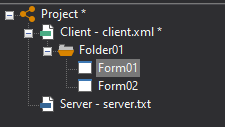
A set of various configuration files for a monitoring system developed with FA-Panel is called a "project." A project is a concept for a monitoring system developed with FA-Panel, and allows you to manage the "client configuration file" that saves the screens created with Panel Editor and the "server configuration file" created with Panel Server together as a project.
(Project image)
FA-Panel provides a frame library (monitoring system template) called the "standard framework," and a project created based on the standard framework is called a "standard project." On the other hand, a project that is built independently without using the standard framework is called an "original project." Each has its own characteristics, and when developing a monitoring system with FA-Panel, you must first choose which style of development you want to use.
This chapter explains the concepts of standard projects and original projects, and how to create each type of project.
content |
overview |
Standard project and original project
|
This article explains the features and function comparison between standard projects and custom projects. If you are unsure whether to create a standard project or a custom project, please refer to this content first. |
Introduction to standard project features
|
This section provides an overview of the basic functions provided by the "Standard Framework". We will also provide concrete examples of what functions can be used by using the standard project. |
|
|
This section explains how to create a standard project using the standard framework. |
|
|
This section explains how to create your own project without using a standard framework. |