Relationship between video recorder and server functions
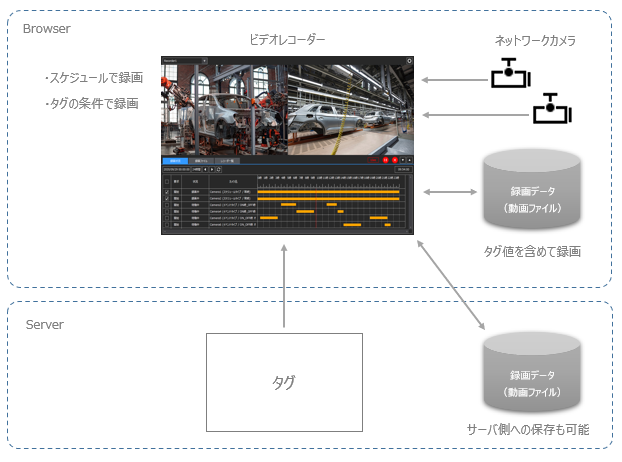
The video recorder's recording process is performed on the client side based on the video data from the network camera connected to the client (Panel Browser).If you want to record using the video recorder function, the client (Panel Browser) must be running.There is no need to define any special actions for the video recorder. If necessary, you can refer to the Panel Server tag and start/stop recording automatically based on the tag value, or include the tag value in the recording data.
In addition, the recording data generated by the video recorder can be saved to the local disk of the client PC running the video recorder, or saved in a public folder on the server side. Recording data saved locally can also be automatically transferred to a shared drive such as a NAS.
|
To record using the Video Recorder, the client (Panel Browser) must be running, but the Video Recorder screen does not need to be displayed all the time. For example, the Video Recorder recording process will continue even if a screen other than the Video Recorder, such as a trend graph, alarm, or other graphic screen, is displayed. |
