About alarm field names
In the alarm function, "field names" are used to define the layout of data items to be saved in alarm history data and to define display columns for the alarm grid on the screen.
There are two main places where you can use alarm field names:
1)Remote alarm grid side settings
2)Alarm serverAction side settings
Although they share some common field names, each has its own unique field definitions.
The specifications for the field names that can be used in each are described below.
Available field names in the remote alarm grid
Remote alarm grid client control uses the field names in each of the following properties:
•Remote alarm grid client control alarm layout (AlarmLayout property)
•Blinking condition of the alarm line of Remote alarm grid client control (AlarmBlink property)
•Alarm line text color (AlarmTextColor property)
•Remote alarm grid client control alarm row background color (AlarmFillColor property)
•Group conditions for the AlarmStateMonitor property of Remote alarm grid client control
For example, the "AlarmLayout" property of the remote alarm grid can be set as follows:
(AlarmLayout property)
[ALARMID] AlarmID, 80, center
[OCCURDATESTR] Occurrence, 140, center
[ARDATESTR] Check/Return, 140, center
[CM1] Alert level, 100, center
[CM0] Message, 2000, left
|
The above "[ALARMID]" and "[OCCURDATESTR]" are the alarm field names. In this example, the first column of the alarm grid is the alarm ID, the second column is the occurrence date and time, and the third column is the confirmation and recovery date and time.
Below are the field names that can be specified in the remote alarm grid.
Field Name |
Data Types |
Commentary |
[ALARMID] |
character |
This is the alarm ID. You must set [ALARMID] in the first column of the alarm layout (AlarmLayout property). |
[ACK] |
Boolean |
Has it been confirmed? |
[RECOVER] |
Boolean |
Whether or not they have returned. |
[TYPE] |
character |
Indicates the type of alarm record. "new" - When it occurred "recover" - On recovery "ack" - When acknowledging "change " - When a change occurs *Cannot be specified when using HISTORICAL2 or HISTORICAL3 |
[TYPEJP] |
character |
Indicates the type of alarm record in Japanese. "Occurrence" - When it occurs "Return" - When returning "Confirm" - When confirming "Change" - When change occurs *Cannot be specified when using HISTORICAL2 or HISTORICAL3 |
[TYPETEXT] |
character |
The property value indicates the type of alarm record. TypeTextNew - When it occurs TypeTextAck - On return TypeTextRecover - When checking TypeTextChange - When changed *Cannot be specified when using HISTORICAL2 or HISTORICAL3 |
[STATE] |
Number |
The alarm status ([ACK] and [RECOVER]) is indicated as a number from 0 to 3. 0th bit Recovery status 0: Recovery 1: Occurrence 1st bit confirmation status 0: confirmed 1: not confirmed * In other words, the values will vary depending on the condition as follows: 0: Returned, confirmed 1: Occurred, confirmed 2: Returned, unconfirmed 3: Occurrence, unconfirmed *Cannot be specified when using HISTORICAL2 or HISTORICAL3 |
[DATE] |
time |
The time when the alarm record was generated. |
[DATESTR] |
character |
The time string when the alarm record was generated. The time format is the standard time format of the OS (varies depending on the OS language). |
[DATESTR:format] |
character |
The time string when the alarm record was generated. You can specify the time format. Example 1) [DATESTR: %Y/%m/%d] - Date only Example 2) [DATESTR: %H:%M:%S] - time only Example 3) [DATESTR: %Y/%m/%d %H:%M:%S] - Date and time Example 4) [DATESTR:@DATETIME.DT.MS] - Date and time, milliseconds For the above time formats, please refer to "CTimeStr Method" and "Date and Time Format (System Format)". |
[ARDATESTR] |
character |
The date and time when the alarm was acknowledged or resolved. Use this if you want to display the acknowledgement and resolution dates and times in the same column when displaying the summary. The time is expressed in the standard time format of the OS (this may differ depending on the language of the OS). |
[ARDATESTR:format] |
character |
The date and time when the alarm was acknowledged or cleared. You can specify the time format. For details, please refer to [DATESTR:format]. |
[OCCURDATESTR] |
character |
The date and time when the alarm occurred. The time is expressed in the standard time format of the OS (varies depending on the OS language). |
[OCCURDATESTR:format] |
character |
The date and time when the alarm occurred. You can specify the time format. For details, see [DATESTR:format]. |
[ACKDATESTR] |
character |
The date and time the alarm was acknowledged. The time is in the standard time format of the OS (varies depending on the OS language). |
[ACKDATESTR:format] |
character |
The date and time the alarm was acknowledged. You can specify the time format. For details, see [DATESTR:format]. |
[RECOVERDATESTR] |
character |
The date and time the alarm was reset. The time is in the standard time format of the OS (this may vary depending on the OS language). |
[RECOVERDATESTR:format] |
character |
The date and time when the alarm was restored. You can specify the time format. For details, see [DATESTR:format]. |
[CHANGEDATESTR] |
character |
The date and time the alarm changed. The time is in the standard time format of the OS (varies depending on the OS language). |
[CHANGEDATESTR:format] |
character |
The date and time when the alarm changed. You can specify the time format. For details, see [DATESTR:format]. |
[CM0]~[CMn] |
character |
This is the comment set in the alarm master file. In the simple format, the leftmost one in the alarm master is [CM0]. Then it is [CM1], [CM2], ... in order. For tag comments, specify them in the same way as [CMn] (do not specify [CMn:TAG]). |
|
For some properties, you can use a combination of expression syntax and field names. For example, the AlarmLayout property from the example above can be defined using expression syntax as follows:
Example of specifying only the field name:
[CM0] Message, 2000, left
Example written in expression syntax:
{[CM3]==1}{[CM0] & "(" & [CM2] & ")"},{default}{[CM0]} Message, 2000, left
In this example, only when [CM3] is 1, the [CM0] string is concatenated with [CM2] enclosed in parentheses and displayed, otherwise [CM0] is displayed as is. For example, it might look like "Xxxx alarm has occurred (95)." In this way, the formula syntax makes it possible to edit and display messages according to conditions.
|

Alarm serverField names available for actions
On the action side, use the field name in the following places:
•Alarm serverAlarm fields specified on the "Saved Items" tab of the action
•Alarm server Group conditions in the format specified in the "Status Monitoring" tab of the action
•Alarm serverThe format of [OUTPUTTAG:xxx] in the alarm master file of the action
For example, in the Alarm server action status monitoring, you can write a condition judgment using field names as follows:
("Status Monitoring" tab of Alarm serverAction)
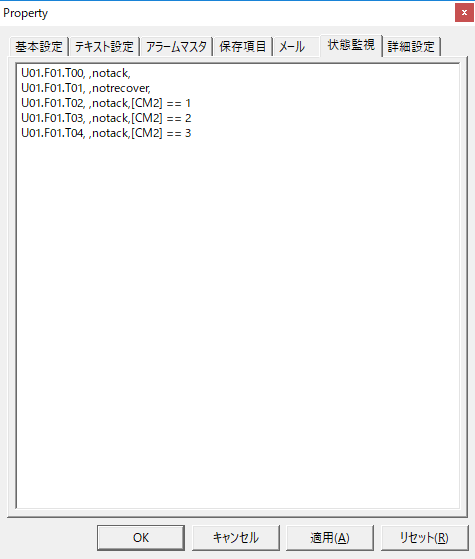
Below are the field names that can be used with the Alarm server action.
Field Name |
Data Types |
Commentary |
[ALARMID] |
character |
Same as Remote alarm grid client control. |
[ACK] |
Boolean |
Same as Remote alarm grid client control. |
[RECOVER] |
Boolean |
Same as Remote alarm grid client control. |
[TYPE] |
character |
Same as Remote alarm grid client control. |
[TYPEJP] |
character |
Same as Remote alarm grid client control. |
[STATE] |
Number |
Same as Remote alarm grid client control. |
[DATE] |
time |
Same as Remote alarm grid client control. |
[DATESTR] |
character |
Same as Remote alarm grid client control. |
[DATESTR:format] |
character |
Same as Remote alarm grid client control. |
[MS] |
Number |
The milliseconds (ms) of each alarm occurrence/recovery time can be included and saved in the alarm record. If you want to display milliseconds in the remote alarm grid, etc., add [MS] to the save item settings. |
[CM0]~[CMn] |
character |
Same as Remote alarm grid client control. |
[CONDID] |
Number |
Same as [CONDID2]. However, when it is returned, it will be the line number of the previous occurrence condition instead of 0 (this is used when you want to know which line's occurrence condition it was last time when it is returned). |
[CONDID2] |
Number |
The current alarm occurrence and recovery status is shown as a number. In particular, when multiple alarm occurrence conditions are defined for one AlarmID (for example, HIHI/HI/LO/LOLO), [RECOVER] will tell you the alarm occurrence status, but not at what level it occurred. In such cases, use [CONDID2]. [CONDID2] will show which line of occurrence conditions caused the alarm to occur (0 if it has been recovered, 1 if it has occurred in the first line of occurrence conditions, and 2 if it has occurred in the second line of occurrence conditions). |
[SECINDEX] |
Number |
If alarms occur at the same time, index numbers within that time period will be assigned sequentially starting from 0. In particular, when saving to a ODBC database, we recommend adding and defining [SECINDEX] in the field specified on the "Saved Items" tab of the Alarm server action in order to maintain the order in which alarms occurred within that time period. |
[ONTIMER] |
Number |
This is the timer (seconds) set by the alarm master until the alarm occurs. |
[OFFTIMER] |
Number |
This is the timer (in seconds) until the alarm is reset, set by the alarm master. |
[ONCOND] |
character |
This is the alarm occurrence condition set in the alarm master. If multiple conditions are defined for the same AlarmID, specify them using [ONCOND:x:] (x is the line number). |
[OFFCOND] |
character |
This is the alarm recovery condition set by the alarm master. If multiple conditions are defined for the same AlarmID, specify them using [OFFCOND:x:] (where x is the line number). |