About the Easy Settings tab (Input/Output)
This section explains the Easy Settings tab for input/output types.
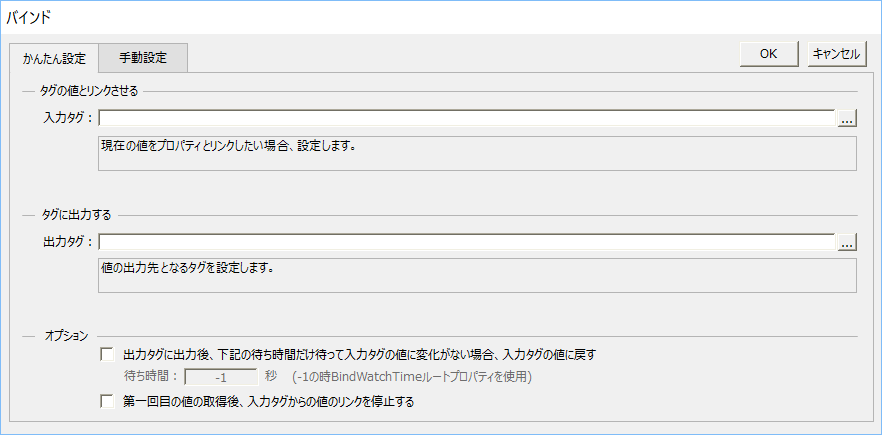
Input tag settings
An input tag is specified when you want to enter a tag value into a property.
In addition to specifying the tag path for the input tag, it is also possible to specify expressions using arithmetic operations and call functions.
Enter the operation syntax including the tag path directly in the input box below.

In most cases, you specify the tag path of the tag you enter.
U01.F01.T01 |
|
You can also specify other property names that your control has in the bind condition by enclosing the property name in "$".
$Property Name$
|

Output tag settings
Specify an output tag if you want to output the property value to a tag.
In addition to specifying the tag path for the output tag, it is also possible to specify expressions using arithmetic operations and call functions.
Enter the operation syntax including the tag path directly in the input box below.

If the input and output are the same tag, specify the same tag path as the input tag.
U01.F01.T01 |
You can also specify a tag path that is different from the input tag.
U01.F01.T02 |
|
The arithmetic expression syntax is explained in detail in the Scripting Guide. For more information on the syntax, see "Calculation Expression Syntax in the Scripting Guide. |
|
When specifying tags for input/output type easy settings, you do not need to write the bind syntax "IN:", "OUT:", "INOUT:", etc. The appropriate bind format will be automatically generated according to the settings. |
|
|
Optional settings
For input/output types, you can specify the following options:

1)"WATCH" option
By checking the option "After outputting to the output tag, wait the following wait time...", you can perform processing equivalent to the "WATCH" option of I/O binding. For details on the WATCH processing, please refer to the WATCH option in "I/O Binding Format".
2)"ONLYFIRSTIN" option
By checking the option "Stop linking from the input tag after getting the first value," you can perform processing equivalent to the "ONLYFIRSTIN" option of I/O binding. For details on the ONLYFIRSTIN option, refer to the ONLYFIRSTIN option in "I/O Binding Format".