overview
When reading and writing tag values from a script, you must first execute "AddTag". When reading tag values, you can read them by calling the "GetVal"/"ReadVal" methods for tags that you have previously executed "AddTag". Also, for tags that you have executed "OnTagValueChanged" event will occur when the tag value changes, and the tag value will be available within the event.
|
For tags registered by specifying FALSE as the second argument of "AddTag", the "OnTagValueChanged" event will not occur. |

In most cases, you should use "GetVal" when reading tags. "GetVal" reads tag values from the cache, which is faster (if you want to read values from the actual device, use "ReadVal").
Furthermore, since "AddTag" is performed on a per-object basis, you need to be aware of which objects "AddTag" has been applied to.
Here we will explain using examples that read tag values in three ways.
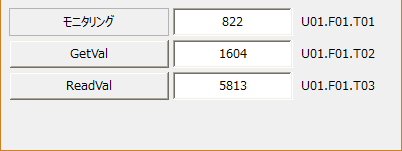
Download the sample
This sample is stored in:
setting
Tag configuration
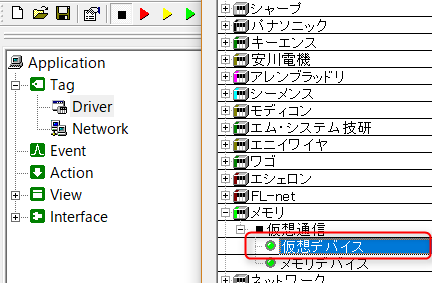
1.Right-click "Driver" and add a virtual device from "Add Unit".
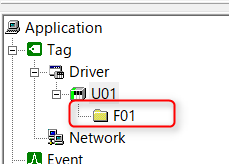
2.Right-click on the added unit "U01" and add "F01" from the Add Folder menu.
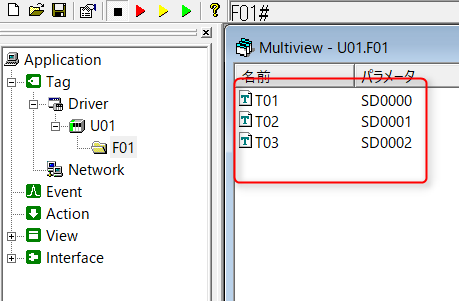
3.Right-click the added folder "F01" and register tags "T01" to "T03". After registration, register the tag "Device" with "05-SD Special Register".
|
For details about the virtual device tags used here, see "Virtual Devices". |
program
Describes the loading process.
*Please refer to the sample for object placement and property settings.
1.In the form object, write the following:
event OnInitialize() { var vTags = c("U01.F01.T01", "U01.F01.T02", "U01.F01.T03");
this.AddTag(vTags); }
event OnTagValueChanged(tagname,value) { if(tagname == "U01.F01.T01"){ this.edt01.Text = value; } } |
2.Write the following to the GetVal button object:
event OnMouseUp(button) { if(button == 1){ var vValue; vValue = parent.GetVal("U01.F01.T02");
if(::IsQualityGood(vValue)){ parent.edt02.Text = vValue; }else{ parent.edt02.Text = "Error"; } } } |
3.Write the following to the ReadVal button object:
event OnMouseUp(button) { if(button == 1){ var vValue;
if(parent.ReadVal("U01.F01.T03", vValue, "device")){ parent.edt03.Text = vValue; }else{ parent.edt03.Text = "Error"; } } } |
Commentary
The form object "OnInitializeIn this example, the tag to be read is specified as "AddTag". Here, multiple tags are grouped together in an array and specified as "AddTag". Also, by omitting the second parameter of "AddTag" (or specifying TRUE), it is possible to obtain values from tags.
Next, the "OnTagValueChanged" event for the same form object will occur every time the tag value set by "AddTag" changes. The "OnTagValueChanged" event will occur with the tag name entered in the first parameter tagname, and the tag value entered in the second parameter value.
In the GetVal button object, use "GetVal" to read the tag value. "GetVal" reads the value from the cache and can process it quickly. In this sample, "AddTag" is used to read the tag value from the form object's "OnInitializeThis is done in the " event. The tag value is read, so "GetVal" is "parent.GetVal("U01.F01.T02")" Also, to check if the tag value is being communicated normally, use the route method "IsQualityGood" is used.
The ReadVal button object uses "ReadVal" to read the tag value. "ReadVal" can specify which data source (server cache value, client cache value, device value) to read the tag value from. However, if you specify reading from the device value, communication with the PLC will occur each time, which will reduce overall performance. Also, you can check whether the tag value is being communicated normally by checking the return value of "ReadVal".
|
For information on the object hierarchy represented by "this"/"parent", please refer to "Object Hierarchy and References". |
|
For information about client and server caches, see "Client Cache and Server Cache". To update the client cache, use "ReadRefresh". |