overview
When reading or writing tag values from a script, you must first execute "AddTag". When writing tag values, you can write to tags that you have previously executed "AddTag" by calling the "WriteVal" method.
Here we will explain using an example of writing a value to a tag.
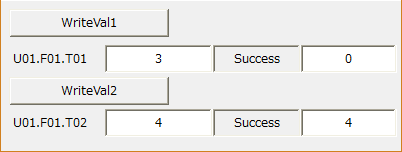
Download the sample
This sample is stored in:
setting
Tag configuration
1.Right-click "Driver" and add a virtual device from "Add Unit".
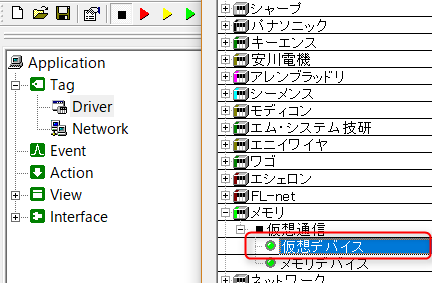
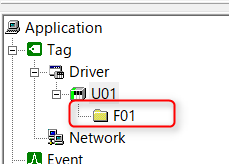
2.Right-click on the added unit "U01" and add "F01" from the Add Folder menu.
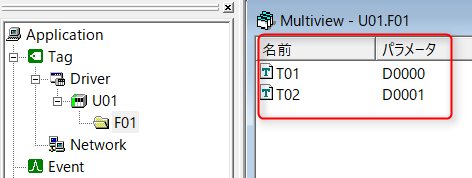
3.Right-click on the added folder "F01" and register tags "T01" to "T02". After registration, register the tag's "Device" as "04-D Data Register".
|
For details about the virtual device tags used here, see "Virtual Devices". |

program
Describes the write process.
*Please refer to the sample for object placement and property settings.
1.In the form object, write the following:
event OnInitialize() { this.AddTag("U01.F01.T01", F); this.AddTag("U01.F01.T02", T); }
event OnTagValueChanged(tagname,value) { switch(tagname){ case "U01.F01.T01": this.edtRead01.Text = value; break; case "U01.F01.T02": this.edtRead02.Text = value; break; }
} |
2.Write the following in the WriteVal1 button object.
event OnMouseUp(button) { if(button == 1){ if(parent.WriteVal("U01.F01.T01", parent.edt01.Text)){ parent.lbl01.Text = "Success"; }else{ parent.lbl01.Text = "Error"; } } } |
3.WriteVal2 Write the following in the button object.
event OnMouseUp(button) { if(button == 1){ if(parent.WriteVal("U01.F01.T02", parent.edt02.Text)){ parent.lbl02.Text = "Success"; }else{ parent.lbl02.Text = "Error"; } } } |
Commentary
In the form object's "OnInitialize", write the tag by "AddTag". Here, the tags are individually "AddTag".
For the tag "U01.F01.T01", the second parameter of "AddTag" is set to FALSE (abbreviated as F). This setting makes it an AddTag for tags that only perform writing. For details, please refer to "AddTag processing for tags that only perform writing".
Additionally, for the "U01.F01.T02" tag, the second parameter of "AddTag" is set to TRUE (abbreviated as T). This setting makes it possible to obtain the value from the tag, and the "OnTagValueChanged" event will occur.
In the WriteVal1 button object, "WriteVal" is used to write the input value of the edit box to one tag. In this sample, "AddTag" is performed within the "OnInitialize" event of the form object. Since the value is written to that tag, "WriteVal" is written as "parent.WriteVal("U01.F01.T01",parent.edt01.Text))". Also, you can check whether the value was successfully written to the tag by checking the return value of "WriteVal".
Writing a value with the WriteVal1 button object does not trigger the "OnTagValueChanged" event of the form object. Writing to the WriteVal2 button object uses the same process to write to "U01.F01.T02," but this triggers the "OnTagValueChanged" event.
|
For information on the hierarchical structure of objects represented by "this"/"parent", please refer to "Object Hierarchical Structure and References". |
AddTag operation for write-only tags
In the second parameter of "AddTag", you can specify a flag to indicate whether or not to obtain the value of the added tag (TRUE: obtain value, FALSE: do not obtain value). If this parameter is omitted, it will be treated as TRUE. Specifying to obtain tag values unnecessarily will result in a processing load due to unnecessary value retrieval. If it is clear that the script will only be writing tags, we recommend specifying FALSE in the second parameter of AddTag.
Furthermore, if value acquisition is set to FALSE, the "OnTagValueChanged" event will not occur, which also has the effect of preventing unnecessary event occurrences.
|
In "AddTag", if you set the value acquisition to FALSE, the tag monitor lamp on Panel Server will be displayed in yellow. Yellow indicates that the tag is connected to from Panel Browser with "no automatic update." If you set the value acquisition to TRUE, the tag monitor lamp will be displayed in red. Red indicates that the tag is connected to from outside with "automatic update."
|
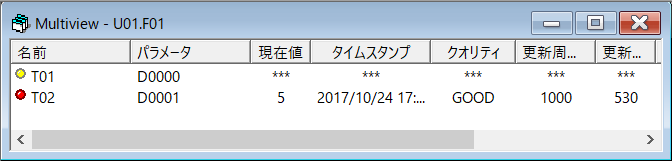
Error handling for tag writing process
Tag write methods such as "WriteVal" and "WriteRefresh" return TRUE/FALSE indicating whether the write process was successful. Possible errors that can occur during the write process include communication failures, server downtime, or problems on the PLC side.
When actually designing your system, you should decide in advance how you will handle errors that occur when writing from a script (retry writing, display a message, ignore the error, etc). In any case, instead of calling the write methods directly, you can wrap these methods as common user-defined functions in the object to centralize error handling.
•Example of error handling for tag write method (Form01 object)
event OnInitialize() { this.AddTag( c( "$D0", "$D1", "$D2") ); //AddTag
if(!WriteValEx("$D0", 100)) { // Write your own error handling here return; }
if(!WriteValEx("$D1", 150)) { // Write your own error handling here return; }
if(!WriteValEx("$D2", 200)) { // Write your own error handling here return; } }
/* * A common function that wraps the write process. * The rule is that this function must be called when writing tags within this object. */ function WriteValEx(tagname, value) { if(!this.WriteVal(tagname, value)){ /* * The overall common processing for write errors is described here. */ return F; } return T; } |