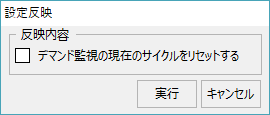
Demand monitoring settings menu
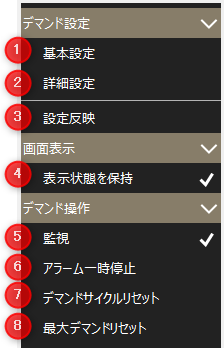
# |
name |
explanation |
|---|---|---|
1 |
Basic Settings |
These are the basic settings for demand monitoring. Basic Settings Screen is displayed.
|
2 |
Advanced Settings |
Detailed settings for demand monitoring. Detailed settings screen will be displayed.
|
3 |
Setting reflected |
The changes made to the demand settings will be reflected in demand monitoring.
|
4 |
Maintain Visibility |
Maintains the display state of the screen. |
5 |
Monitoring |
Switches the operation status of demand monitoring. If checked, monitoring is in operation, if unchecked, it is stopped.
|
6 |
Alarm pause |
Pauses demand alarm monitoring. If checked, the alarm is stopped, if unchecked, the alarm is being monitored. If you pause while an alarm is occurring, the currently occurring alarm will be restored. If you cancel the pause while demand monitoring is still in an alarm state, the alarm will occur again at the update cycle when the graph is refreshed.
|
7 |
Demand Cycle Reset |
Immediately resets the current demand monitoring cycle.
|
8 |
Maximum Demand Reset |
Reset the maximum demand value.
|