Open parameters for guidance
This screen library can call up two screens: "Guidance Viewer" and "Guidance Registration."
When calling up each screen, you can specify the following open parameters.
■ Guidance viewer screen
name |
Parameters |
explanation |
||||||
Display Information Index |
Index
|
Specify the index of the guidance master and open it. The guidance information of the specified index will be displayed. |
||||||
Search Keywords
|
Key
|
Specify the search keyword and open it. |
||||||
Unique ID
|
UniqueId
|
Open it by specifying the unique ID. |
||||||
File List Display
|
IsFileList
|
Specifies whether to display the file list.
|
||||||
Automatic Updates |
IsAutoUpdate
|
Specifies whether to automatically update the guidance display when the settings are updated.
|
||||||
Display Type |
Type
|
Specifies the display mode of the guidance viewer as a string.
|
||||||
Display new guidance button |
ShowAddNewButton |
Specifies whether or not to display the "+" button (new guidance addition button) in the upper right corner of the screen when the guidance viewer is opened with an unmatched keyword specified.
|
||||||
Setting button display
|
IsConfig
|
Specifies whether to show or hide the setting button "..." in the upper right corner of the screen.
|

■ Guidance registration screen
name |
Parameters |
explanation |
||||||||||||
Control where to notify the selection results |
Target
|
If you set the object of the control that called the parameter to this parameter, the notification of the selection result of the guidance will be returned to the specified object. This parameter is only valid when "SELECT" is specified as the display type below. |
||||||||||||
Display Type |
Type
|
Specify the display mode of the guidance registration screen as a string. The behavior of this screen changes depending on the display type.
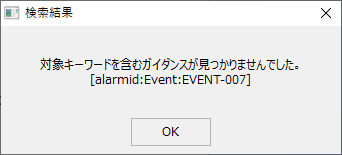
Furthermore, if you specify "SEARCH" or "EDIT" for Type and there is no guidance that matches the conditions, the following message will be displayed.
|
||||||||||||
Whether or not to use unique IDs
|
IsUniqueId
|
Specifies whether to use a unique ID for the guidance information.
|
||||||||||||
Unique ID
|
UniqueId
|
Specify the unique ID as a string. Opens the guidance for the specified unique ID. This parameter is only valid when IsUniqueId is TRUE and Type is "EDIT" or "SEARCH". If multiple search conditions are specified at the same time, the search will be performed in the following order: UniqueId, Index, Key. |
||||||||||||
Display Index
|
Index
|
Specify the data index of the guidance master. Opens the guidance corresponding to the specified index. This parameter is only valid when Type is "EDIT" or "SEARCH". If multiple search conditions are specified at the same time, the search will be performed in the order of UniqueId, Index, and Key. |
||||||||||||
Search Keywords
|
Key
|
Specify the search keyword as a string. This parameter is only valid when Type is "EDIT" or "SEARCH". If multiple search conditions are specified at the same time, the search will be performed in the following order: UniqueId, Index, Key. |
||||||||||||
Additional search keywords
|
AddKey
|
When you specify "ADDKEYSELECT" for Type, specify the additional search keyword as a string. |
||||||||||||
Search Type
|
KeySearchType
|
Specifies the type of search operation as a string.
|