Guidance Custom Properties
The custom properties of this screen library are available in the "_GuidanceHidden" form.
Basic |
Forwarding server name |
_FileServerName |
default:Not specified
This property is reserved for future support. There is no need to set it (just leave it blank).
■About the public folder of Panel-Interface
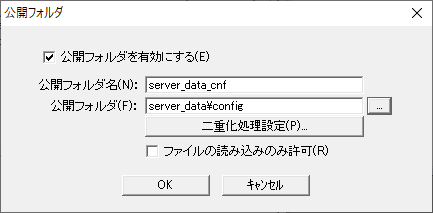
The setting information for this screen library is automatically saved in the necessary subfolders that are defined as the Panel-Interface public folder "server_data_cnf". If a public folder has not been created, please refer to the following to create a public folder called "server_data_cnf" from the Panel Server Panel-Interface settings screen. For information on how to register a public folder, please refer to "Panel-Interface Basics".
(Public folder settings for Panel-Interface: server_data_cnf)
•Enable public folder: Check •Public Folder Name: server_data_cnf •Public folder: server_data\config •Allow file reading only: Uncheck
|
Configuration file name |
_MasterFile |
default:guidancemaster.csv
The file name of the guidance configuration file.
|
|
Use of unique ID |
_IsUniqueId |
default:True
This is used as the initial value for whether to display the unique ID input box on the guidance registration screen. If the "IsUniqueId" open parameter is specified, the open parameter setting will be used.
|
|
Playable video file extensions |
_EnabledSoundExtension |
default:Not specified
Specifies the extension of video files that can be played with audio. If you want to specify multiple files, separate them with a semicolon (;). When a video file is played on the guidance viewer, audio will automatically be enabled for files with the extension specified in this property.
*Please list only file extensions that can be reliably played in the PC environment in which the video will be played. *Even if the file has an extension that is not defined in this property, as long as the file can be played on the target PC, you can manually enable the audio on the screen and play the file (this does not mean that the file cannot be played unless all file extensions are defined in this property).
|