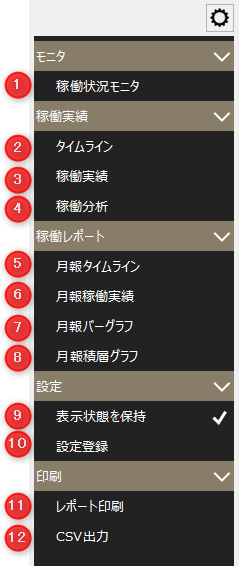
Operation monitoring settings menu
# |
name |
explanation |
||
|---|---|---|---|---|
1 |
Operation status monitor
|
The operation status monitor screen will be displayed.
|
||
2 |
Timeline
|
Displays the Timeline screen.
|
||
3 |
Operational track record
|
The operation results screen will be displayed.
|
||
4 |
Operation Analysis
|
The operation analysis screen will be displayed.
|
||
5 |
Monthly Report Timeline
|
The Monthly Report Timeline screen will be displayed.
|
||
6 |
Monthly operation results
|
The monthly operation results screen will be displayed.
|
||
7 |
Monthly Bar Graph
|
Displays the monthly bar graph screen.
|
||
8 |
Monthly stacked graph
|
Displays the monthly stacked graph screen.
|
||
9 |
Maintain Visibility
|
The settings changed on the screen will be retained. Note that the settings are saved for each client.
|
||
10 |
Setting registration |
The "Settings screen" will be displayed as a pop-up.
|
||
11 |
Report printing |
Prints the content displayed on the screen as a report.
|
||
12 |
Save CSV |
The contents displayed on the screen will be saved to a CSV file.
|
