Direct login via the Internet
Direct login can also be performed via the Internet.
The following configuration example is for running Panel Server on a PC running within an intranet and connecting from outside via the Internet.
The IP addresses, port numbers, etc. in the diagram are example settings. Please change them to suit your actual environment.
■ Network configuration example
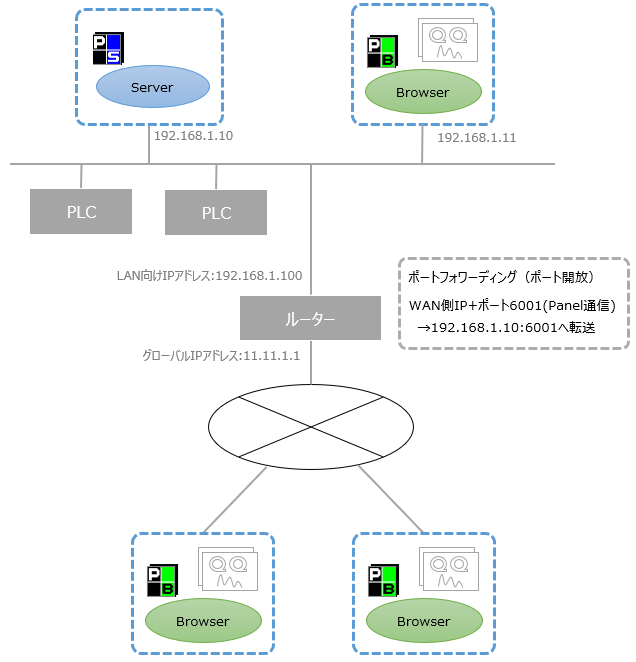
The table below is a configuration example using the IP addresses and port numbers shown in the diagram above.
Setting Panel Server |
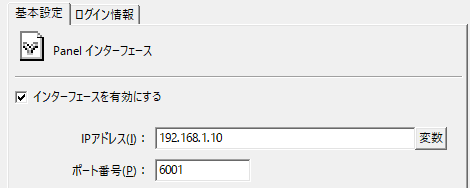
Set the following in the Panel-Interface settings for Panel Server.
•IP address: "192.168.1.10" •Port number: "6001"
|
Setting Panel Browser |
Specify the PSNode and PSPanelPort as follows on the login screen (or login INI file) of the Panel Browser that you will be using to connect to a direct login from outside the site.
•PSNode: "11.11.1.1" - Set the global IP address of the router •PSPanelPort:「6001」
|
Router configuration |
When connecting to an intranet from the Internet in an external environment, a fixed global IP address that does not change is required (alternatively, you can use a service such as DDNS). In the router settings, set up port forwarding (opening ports) for packets from the WAN side to the LAN side.
•"Packets to port 6001 from the WAN side" → "Forwarded to port 6001 on Panel Server (192.168.1.10) in LAN"
For instructions on how to set up port forwarding on your router, please refer to the router manual.
|
|
If there is a firewall on the network path, you must set it to allow port 6001. In addition, when selecting a router, it must be a model that supports port forwarding. For details on router settings and other information, please contact the manufacturer of the router you are using. |
