Standard project login settings (Login settings for Panel-Interface/Public projects)
In a standard project, the login information is already set.
If necessary, change the settings to suit your actual operating environment.
|
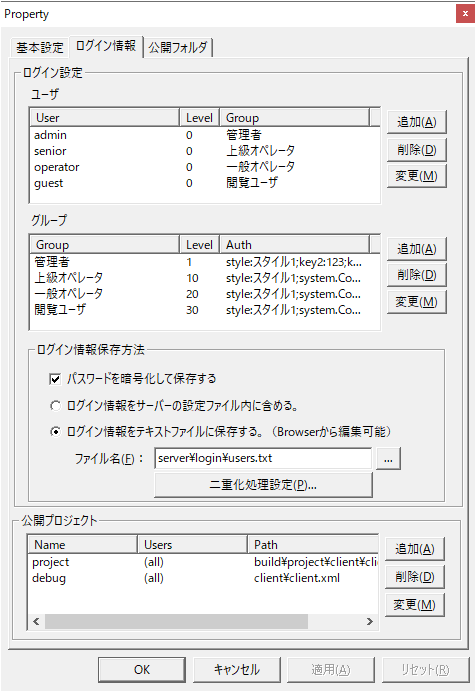
Shown on the left is the properties screen (login information) for Panel-Interface on Panel Server.
The following settings have been configured in advance:
Login settings/
User
|
Login user information for Panel Server.In a standard project, user information is edited from the client's user management screen, so there is no need to make any changes.
|
Login settings/
group
|
Group information for the user. As above,In a standard project, group information is edited from the client's user management screen, so there is no need to change it.
|
Login settings/
How to save login information
|
The following settings are already configured in the standard project. In most cases, there is no need to change them.
•"Encrypt and save passwords" - make sure to check the box
•"Save login information in a text file" - be sure to select this
•File name: server\login\users.txt - do not change
If you are using a duplicated configuration for Panel Server, please configure the duplication process. For details, please refer to "Operation with Server Duplication".
|
Public Projects
|
Define the public project to connect to by direct login from the client. When setting up a public project, set the project name (the name of the project specified for direct login), project path (path to the client configuration file executed on the client), and permitted users (user names permitted for direct login).
By default, the following two public projects are registered.
Project name
|
Setting contents
|
project
|
This is a public project designed for practical use.
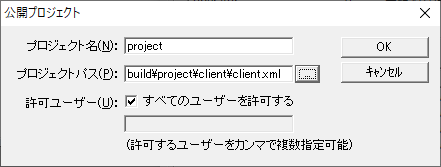
Project path: build\project\client\client.xml
still,If you want to encrypt the configuration files during the setup process, change the file name extension in the project path from "xml" to "brw".
Allowed Users: All users allowed
|
debug
|
This public project is intended for use during development. If you do not need it during production, please delete it.
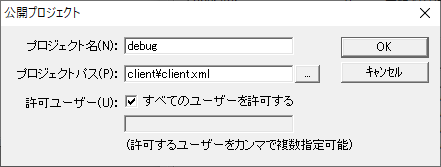
Project Path: client\client.xml
Allowed Users: All users allowed
|
|

|
The public project "debug" above has been prepared with the assumption that it will be used for testing during the development of the client screen, and the project path is set to point to the actual development client configuration file. When running the client with direct login during development, if you specify "debug" as the project name on the direct login screen, it will run based on the development client configuration file (not the distribution file). This allows you to easily run direct login and check the operation without having to perform the setup process every time in the development environment.
|
|