overview
This article explains how to run Panel Browser as an embedded Exe.
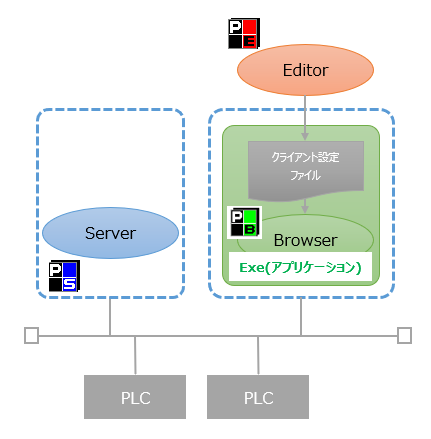
(Execution image in embedded exe format)
|
The setup function of Panel Editor can output an executable file with Panel Browser embedded (an embedded Exe file). This Exe file contains Panel Browser itself, as well as a client configuration file and a set of resource files required for execution. You can run the client at runtime by placing the created executable file anywhere on the actual PC and running it.
In addition, Panel Browser must be installed on the PC to run the built-in Exe of Panel Browser.
|
Please see the content below for instructions on the setup process to run Panel Browser embedded in Exe.
•Setup for running embedded exe
Also, for information on how to run the client using the built-in exe, see below.
•Running the built-in Exe client