Open and execute the configuration file on the Web server using a URL
|
This function is an old function that was used before the release of Direct Login Execution (it remains in place for backward compatibility with older versions). This function was mainly used in situations where multiple client PCs were used, to centralize the placement of client distribution files in one place, but the same need can be realized by Direct Login Execution. Direct Login does not require a separate Web server, and can be configured using only the functions of this package product. If you do not want to place client distribution files on each client PC, use the Direct Login function. For details, see "Execution by Direct Login". |

Panel Browser can open a configuration file by specifying it with a URL. With this method, the set of distribution files output by the setup function of Panel Editor is placed on a separately prepared Web server (HTTP server), and the Panel Browser of each client PC can read and run the client configuration file by specifying the URL of the client configuration file placed on the Web server. By using this function, for example, when operating with a large number of client PCs, the client distribution files can be placed only on the Web server, and each client can retrieve and run the files from the Web server via URL.
(System configuration example)
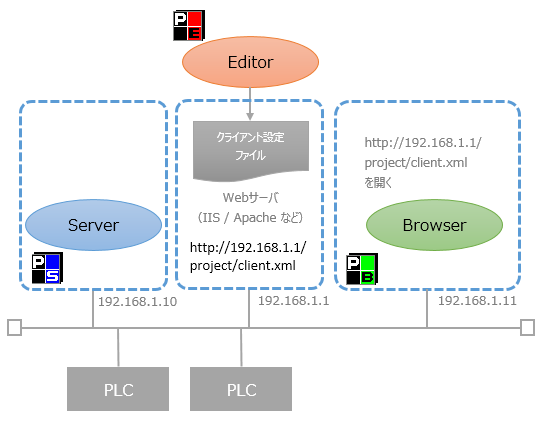
How to open the configuration file with URL (launch Panel Browser)
Below we explain how to open a configuration file by URL.
1.From Panel Editor, perform the setup process for running the file distribution format and place all distribution files on the Web server.
2.Launch Panel Browser.
3.Select the "URL" tab from the screen and enter the URL pointing to the client configuration file placed on the Web server.
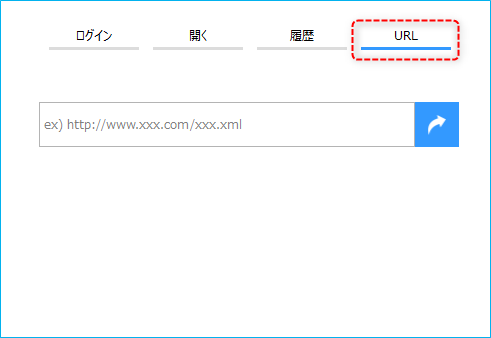
Example) http://WebServer address/Deployment folder/xxx.xml
|
If you encrypted the file during the setup process, open it with the file extension "brw". |

4.Panel Browser loads the client setting file of the specified URL and displays the client screen.