Setup process for running the embedded exe
To run Panel Browser as an embedded Exe, select "Use executable file distribution format" from the setup function of Panel Editor and run the setup process. This will output an executable file (embedded Exe file) that incorporates Panel Browser itself, the client configuration file, and all the files referenced by the client configuration file.
This Exe file contains the Panel Browser main body as well as a set of data necessary to display the client screen.
The following is an overview of the files output by the setup function.
file |
overview |
Embedded Exe File |
The Panel Browser main body, the client configuration file, and all the files referenced by the client configuration file are built into a single executable file (with the extension "exe").
|
|
For details about the setup process, please also refer to "About the client setup process" in Preparation before system implementation. |

How to set up
1.Click the Setup button on the Panel Editor toolbar.

2.The "Create files for distribution to clients" screen will be displayed.
Select "Use executable file distribution format" from the combo box.
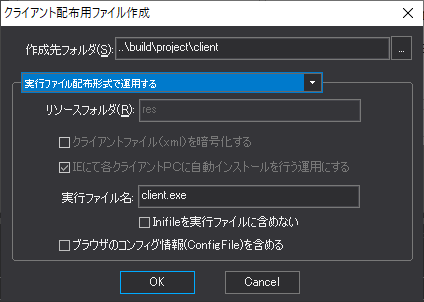
Please specify the following parameters from the above dialog.
Destination Folder |
Specifies the folder to output by the setup function. If SetupFolder is specified in the root property, it will be used as the default.
|
Executable Name |
Specifies the file name of the executable file. |
Do not include Inifile in executable file |
If the root property is externalized in the Inifile root property of the client configuration file, checking this item will not include the configuration file specified in the Inifile root property in the exe file (the configuration file will not be copied, so create it if necessary). When running on multiple PCs, check this item if you want to specify a separate configuration file for each client.
|
Include browser configuration information (ConfigFile)
|
If checked, the client configuration information (the configuration file defined by the ConfigFile root property) will be included in the setup and output. |
|
The initial settings such as the folder name displayed in the above dialog can be specified in the root properties. For details, see "About the client setup process". |
3.When you click the "OK" button, the embedded Exe file will be output to the "Destination folder".