Panel Server startup options
You can specify the startup conditions by adding option information when starting Panel Server. Also, the startup option specification takes priority over the settings in the "Auto Start Settings".
The format for specifying options is as follows:
•In the above format, "□" represents a half-width space. • •/option1 to /optionX are option specifications.
|
The options that can be specified in /option1 to /optionX are as follows.
option |
explanation |
/online_debug |
Start in online debug mode. |
/online_monitor |
Start in online monitor mode. |
/online_fast |
Launch in online fastest mode. |
/lockstop:[password] |
Specify the password to use when offline. Example: /lockstop:abc |
/startupwaitingtime |
Startup wait time. |
/licensechecktimeout |
License check timeout period. |
/editor |
Start in edit mode. In edit mode, you can only edit the configuration file. If you want to rewrite the configuration file while online, you can start it as another process in edit mode and edit the configuration file. |
/dupmain |
Start it as the main machine with dual settings. |
/dupsub |
It will start up as a secondary machine with a duplicated setting. |
/encrypt:[sourcefilename] |
Encrypts the specified file. If you specify this option and run Panel Server, the screen will not be displayed, and the program will only encrypt the file and then exit. When running with this option, the program can be run even if another Panel Server is running. For details, see the description in "Encrypting script files (Script Ver2)". Example) /encrypt:script.txt |
/encryptout:[encryptfilename] |
Specifies the output file name for the encrypted file generated above. Example) /encryptout:script.enc |
|
When specifying the "Panel Server installation path" and "Server configuration file path", if the path contains half-width spaces (such as "Program Files"), the entire path must be enclosed in double quotation marks.
|

|
If you want to change the launch icon of a shortcut, open the shortcut's properties and select the icon you want to change from "Change Icon". |
|
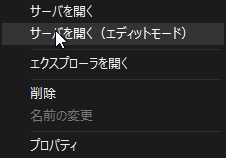
The edit mode launched with the /editor option is a convenient mode when you want to rewrite the configuration file while online. Normally, you cannot launch two Panel Servers at the same time, but the edit mode will be launched separately from the currently running one. You can also launch the server in edit mode by right-clicking the Panel Server configuration file in the Panel Editor workspace view and selecting "Open Server (Edit Mode)".
|
|
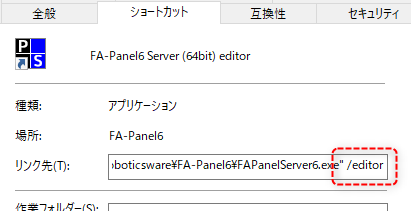
You can launch Panel Server in edit mode by specifying the "/editor" option in the shortcut settings that launches Panel Server.
(Example of specifying "/editor" (※The following is an example of FA-Panel))
|