Setting up the connection to the Nekaroku camera
This article explains how to register a camera to connect to Nekaroku. For details on how to operate the camera registration screen, please refer to "Camera Registration".
Normally, in systems where Necarok is installed, a network camera is connected to Necarok and recording is performed using the functions on the Necarok side. By setting the following from camera registration, you can display live images from cameras connected to Necarok and view/play recording data on the Necarok side.
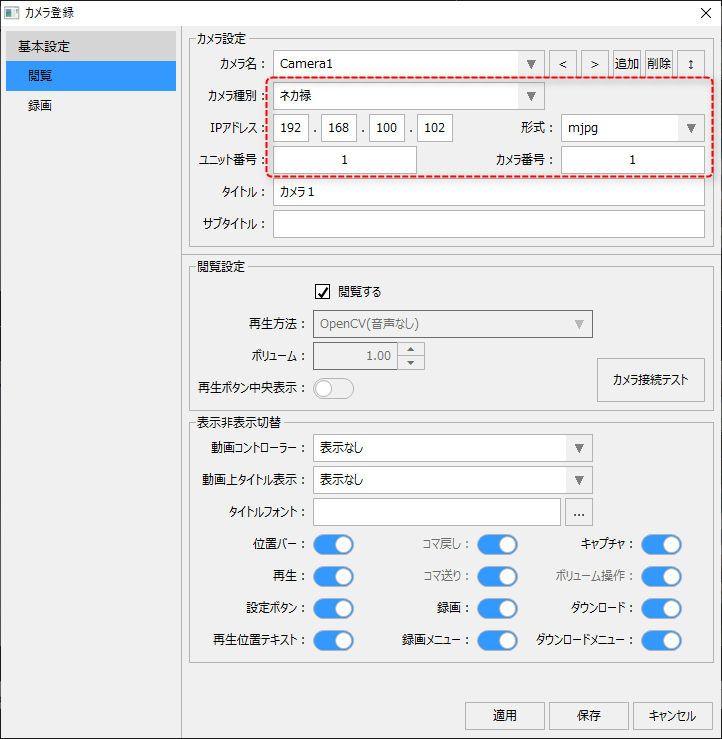
|
First, in the camera settings for camera registration, set the following:
Camera Type
|
Select "Nekaroku."
|
IP address
|
Specify the IP address set in the Nekaroku. Please note that this is not the IP address of the camera itself.
|
format
|
This is a video compression method that connects with Nekaroku.
Select either "mjpeg" or "liveget_h264".
|
Unit Number
|
Specify the unit number of the Nekaroku.
|
Camera Number
|
Specify the camera number of the Nekaroku.
|
|
|
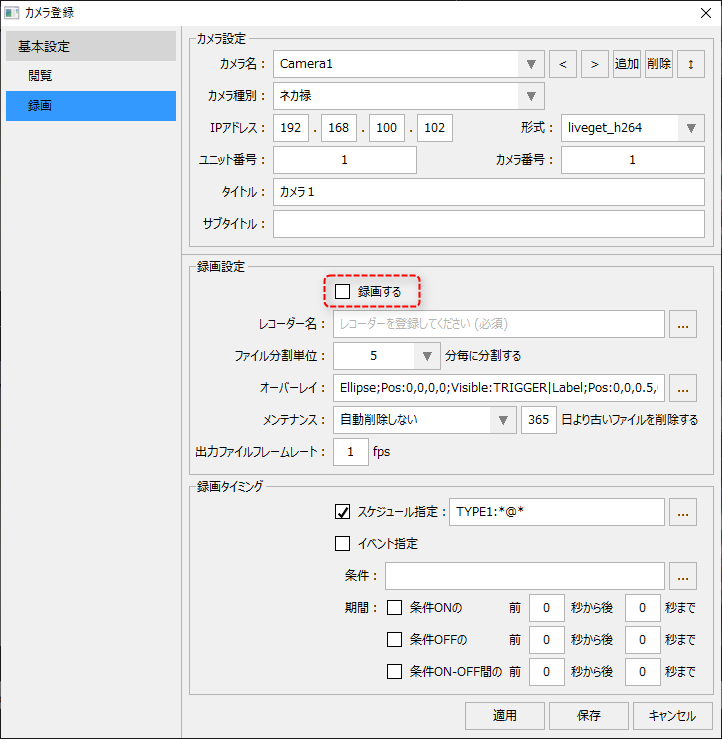
In systems where Nekaroku is installed, the recording process is usually done by Nekaroku. Therefore, we set it so that recording using the video recorder function of FA-Panel is not performed.
Specifically, set it up as follows:
Check what to record
|
Uncheck it.
|
Recorder Name
|
No selection.
|
By setting it up in this way, recording will not be performed using FA-Panel's video recorder function, and when playing back recordings from a video player, etc., the recording data on the Necarok side will be referenced.

|
If you configure recording settings for the Necarok camera (check "Record" and assign a recorder), recording will also occur on the video recorder. Network cameras connected to Necarok are originally connected for the purpose of recording on the Necarok side, and recording is usually performed on the Necarok side. Therefore, unless there is a special reason, recording should not normally be performed using the FA-Panel video recorder function.
|
|
When using Necarok, the recording settings for Necarok must be configured on the Necarok side. Please note that the recording settings on this setting screen (such as checking "Record") and the recording timing settings are for the video recorder function and are not linked to the recording settings on the Necarok side.
|
|