About Form Stretch Mode
The stretch mode is a property that specifies the behavior when the screen size is changed. Be sure to set the appropriate value for the stretch mode of each form depending on the purpose of the screen to be displayed.
The stretch mode is set for the form's "Stretch" property. This property can be set from the Form Settings dialog's Advanced Settings > Form "Stretch" setting.
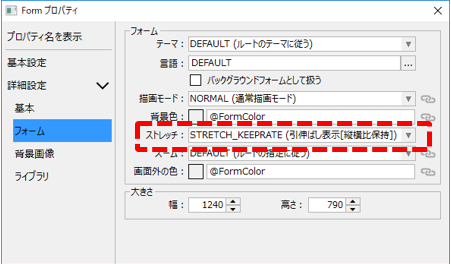
The Stretch property has the following settings:
Setting Value
|
explanation
|
CURRENT
|
The settings of the previously displayed form will be inherited.
|
ROOT
|
The route property Stretch is respected.
|
NONE
|
No stretching is performed and the form is displayed at its actual size.
|
STRETCH_FULL
|
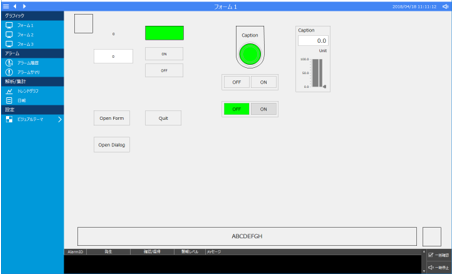
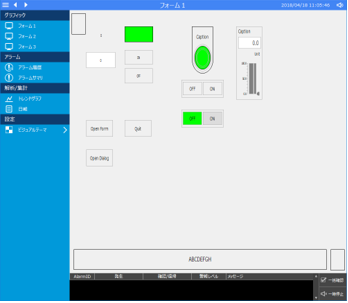
It will be stretched to fit the display size. If you set STRETCH_FULL, the aspect ratio of the original form will not be maintained and the form will be stretched to fill the display frame.
(Before resizing)
(After resizing)
|
The example on the left shows how to change the display width of Panel Browser.
The form display is stretched to fill the entire display frame, and the shapes placed on the screen are displayed vertically longer than their original size.
Therefore, if you are not particularly concerned with changes in the shape of the objects and text you place, and what is important to you is that the screen fills the entire display frame, you should select this mode.
|
|
STRETCH_KEEPRATE
|
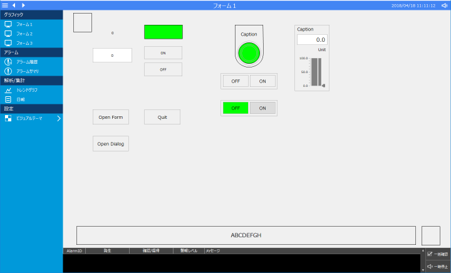
It will be stretched to fit the display size (maintaining the aspect ratio). If you set STRETCH_KEEPRATE, the form will be enlarged or reduced to fit the display frame while maintaining the aspect ratio of the original form.
(Before resizing)
(Example of narrowed width)
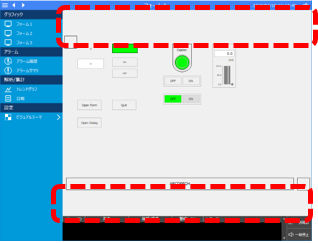
|
The example on the left shows how to narrow the display width of Panel Browser.
Each object is scaled down while maintaining its aspect ratio. However, margins are displayed at the top and bottom of the main area as shown on the left.
|
(Example of wider width)
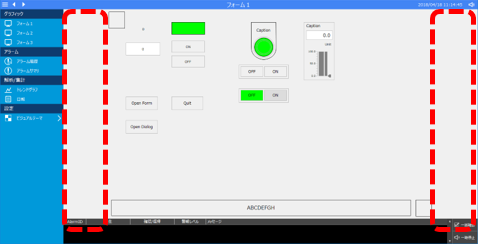
|
The image on the left is an example of expanding the display width of Panel Browser.
Each object will be displayed with its aspect ratio maintained, as shown on the left, but margins will be displayed on the left and right of the main area, as shown on the left.
Therefore, if you want to keep the shape of an object when the screen is enlarged or reduced (for example, if you want a circle to remain an accurate circle, or if the aspect ratio of the screen image is important), you should select this mode.
|
|
RESIZE_FULL
|
Dynamically resizes the form itself according to the display size. When RESIZE_FULL is set, the size of the displayed form itself is dynamically resized according to the size of the display frame, and the display position and size of each object placed on the form are displayed according to the resize settings (AutoResizeX, AutoResizeY properties) of each object.
Below is an example of placing the two controls shown below at the bottom of a form and changing the settings of the AutoResizeX and AutoResizeY properties.

(Property settings for a horizontal rectangle)
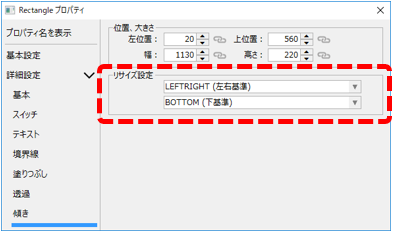
|
Set the resize settings (AutoResizeX, AutoResizeY properties) to LEFTRIGHT and BOTTOM.
|
(Property settings for the square in the bottom right corner)
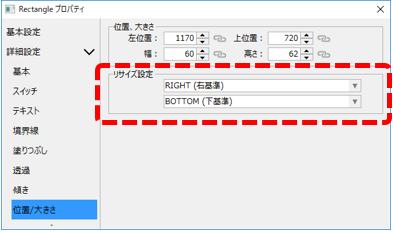
|
Set the resize settings (AutoResizeX, AutoResizeY properties) to RIGHT and BOTTOM.
|
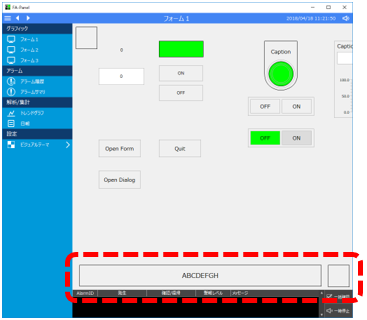
(Example of narrowed width)
|
The example on the left shows how to narrow the display width of Panel Browser.
You will then see that the square in the bottom right corner to which RIGHT and BOTTOM are set has moved its display position while maintaining the object size (it will always be displayed in the bottom right corner).
Additionally, you can see that the width of a horizontal rectangle that has been set with LEFTRIGHT and BOTTOM is reduced while the vertical height is maintained, and the size of the text is also maintained.
|
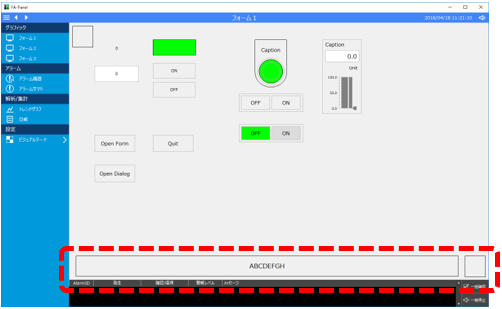
(Example of wider width)
|
The image on the left is an example of expanding the display width of Panel Browser.
If you widen the width, the behavior will be the same as above.
In this way, when you set RESIZE_FULL, the size of the displayed form itself will be dynamically resized to match the size of the display frame, and the display position and size of each object placed on the form will be displayed according to the resize settings of each object (AutoResizeX, AutoResizeY properties).
This mode is suitable when you want each component, such as a grid or graph, placed on a form to be dynamically resized when the size is changed.
|

|
Various screen libraries such as trend graphs are built using the stretch mode "RESIZE_FULL" function.
|
|
RESIZE_KEEPRATE
|
The form dynamically resizes itself to fit the display size (maintaining aspect ratio).
|
|
For more information about the form's Stretch property, see the Form Controls section of the Control Reference.
|