overview
Various settings for the standard framework must be configured from the System Settings screen, which must be displayed from the client screen of the standard project.
Therefore, to display the system settings screen, both Panel Server and Panel Browser must be running online.
(Standard framework system settings screen)
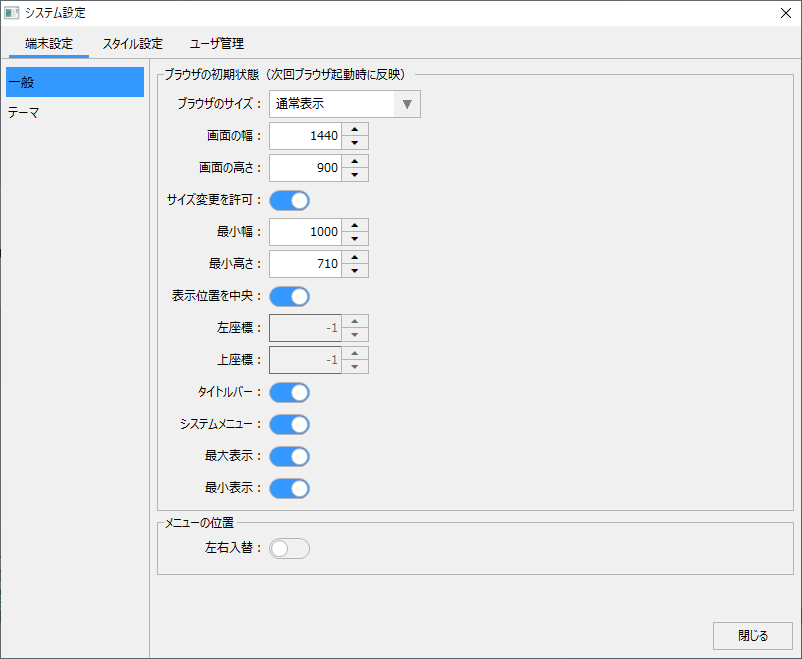
The settings on the system settings screen can be broadly divided into "Device Settings" (browser screen display settings), "Style Settings" (layout and menu editing), and "User Management".
Of the above, this chapter will provide more details on terminal settings and style settings.
content |
overview |
Display the system settings screen
|
This section explains how to display the system settings screen. |
Browser screen display settings (device settings)
|
We will explain in detail the browser screen display settings (device settings) with examples of settings such as normal display and full-screen display. |
Editing layout and menu (styling)
|
This section provides detailed explanations with examples on the concept of styles, layout editing of standard frameworks, and how to edit menus. |
|
|
This is a technical explanation of specifications regarding system settings and how to create menus with your own button layouts without using the standard menus. |
|
For details about user management (login function), please refer to "User Management (Login) for Standard Projects". |
