overview
Just like with normal forms, you can pass parameters when opening a form as a dialog using "Open Parameters".
Open parameters can be specified in the openParam argument of the common method "OpenDialog", the route "OpenForm" method, "OpenViewForm" method, etc. The received parameter value can be retrieved by calling the form's "GetOpenParam" method in the OnInirtialize event of the called form. For details on how to give and receive form parameters, please refer to the explanation of the form's "GetOpenParam" method.
Example implementation of dialog open parameters
This section describes how to pass parameters to a dialog using open parameters.
(Target sample: e.g.2)
•Dialog calling form: Form01
•Form to display as a dialog: Form03
(Processing Contents)
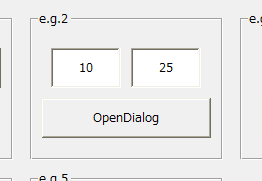
•On Form01, place one Button control to call the dialog and two edit boxes to input parameters. In the button's OnMouseUp event, specify the values of both edit boxes as the open parameters and call the OpenDialog method to display Form03 as a dialog.
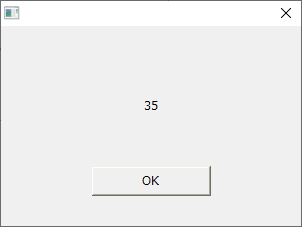
•In Form03, place one Button control to close the dialog box, and one label to display the calculated value. In the OnInitialize event of Form03, add the values received in the open parameters and display the result in the label.
■ Implementation of Form01
Place one button and two edit boxes. For this example, name the edit boxes Edit1 and Edit2, and set TextType to NUMBER. This allows only numeric input into each edit box.
In the button's OnMouseUp event, write the code to call Form03 as a dialog (OpenDialog method). As an example, write it so that the value of Edit1.Text is passed as the open parameter "Param1", and the value of Edit2.Text is passed as "Param2". Note that the open parameter is specified in the third argument of OpenDialog. The second argument (dialog parameter) will not be specified this time, so leave it blank.
event OnMouseUp(button)
{
	var vOpenParam = c("Param1:" & parent.Edit1.Text, "Param2:" & parent.Edit2.Text);
	::OpenDialog("Form03","",vOpenParam);
}
■ Implementation of Form03
Place one button and one label. For the purposes of this example, name the label Label1 and set the button's Text property to "OK."
Define the OnInitialize event for Form03 and use the GetOpenParam method to extract the values of "Param1" and "Param2" from the open parameters, then add them together and assign the result to the Text of Label1.
event OnInitialize()
{
	var vParam1 = ::CInt(this.GetOpenParam("Param1"));
	var vParam2 = ::CInt(this.GetOpenParam("Param2"));
	this.Label1.Text = vParam1 + vParam2;
}
In the OnMouseUp event of the button, write the process to close the dialog (the CloseDialog method). For details on closing the dialog, see the implementation example in "Displaying a form as a dialog".
event OnMouseUp(button)
{
	::CloseDialog(parent.GetDialogName());
}
■ Operation check
Run Panel Browser and display Form01.
Enter any number in the edit box of Form01 and click the button.
Form03 will then be displayed as a dialog, and the sum of the numbers entered in the edit boxes above will be displayed in a label.
(Display example)