What is a form?
The screen displayed on the monitoring screen is called a "form."
Forms are edited using Panel Editor. The form itself is like the base of the screen, and acts as a canvas for a painting. Most of the screen development work in Panel Editor involves pasting and editing parts called "controls" and "parts libraries" on the base form, and adding movement. By combining the pasted controls according to the purpose, you can graphically represent monitored equipment such as motors, pumps, and valves, and display numerical displays, digital displays, and operation switches on the screen.
(Form with various parts attached)
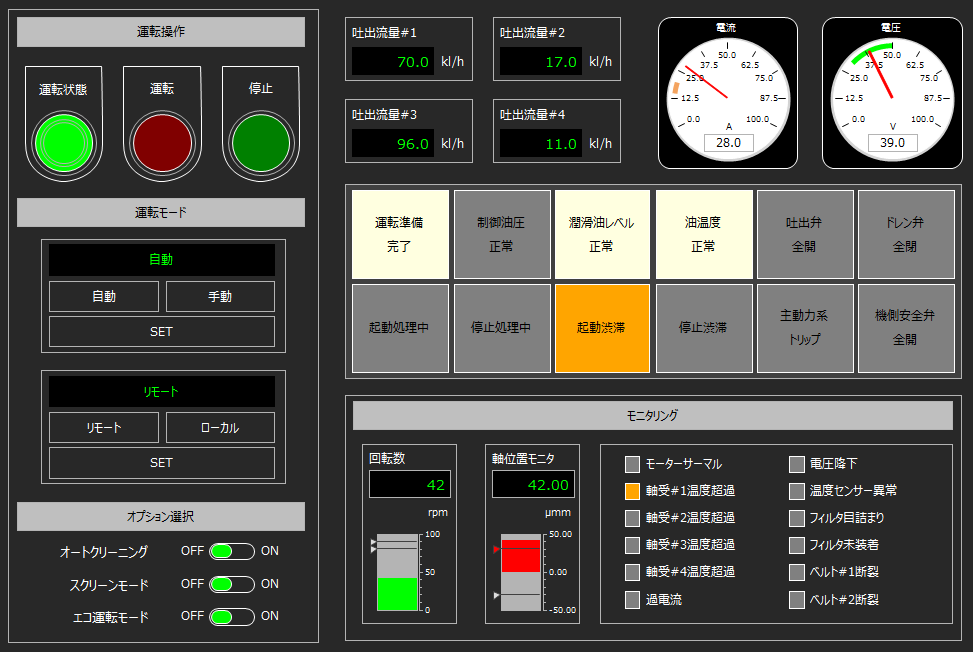
Forms can be displayed in a variety of ways, including as a single screen, as a pop-up dialog, or by embedding multiple forms using frames or View control.
Below we'll explain various ways to display forms, including using dialogs, frames, and View control.
content |
overview |
Variations in how the form is displayed
|
Describes variations in how forms are displayed. |
About form names and view names
|
This section explains the concept of form names and view names, and how to display forms for each view. |
|
|
Users can create their own forms and display them as popup dialogs. These dialogs are called user dialogs. This section describes how to display user dialogs. |
|
|
FA-Panel has a built-in function for displaying generic dialogs. This function is called the common dialog. This section explains how to display the common dialog. |
|
|
Unlike common dialogs, Windows dialogs are dialogs that use standard functions that are already provided as standard in the OS (Windows). This section explains how to display Windows dialogs. |
|
|
This article explains how to embed a form in a page. You can also split the screen in this way. |
|
|
This section explains how to split the screen using frames. |
|
|
You can open a form that runs constantly in the background. Such forms are called background forms. You can implement processes that you want to run all the time. |