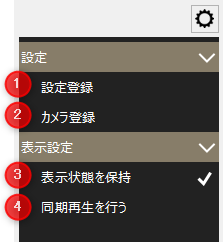
Split screen settings menu
# |
name |
explanation |
|---|---|---|
1 |
Setting registration
|
The "Settings screen" will be displayed as a pop-up. |
2 |
Camera Registration
|
Calls camera registration. This menu item is displayed only when "CAMERA" is specified in the priority type (PriorityType) of the open parameter. For details about camera registration, see "Camera Registration" in the Surveillance System Construction Guide. |
3 |
Maintain Visibility
|
The settings changed on the screen will be retained. Note that the settings are saved for each client. |
4 |
Synchronized playback
|
Performs synchronous playback of the recording data from the camera currently being displayed. |