Split View Custom Properties
The custom properties of this screen library are as follows:
Basic |
Keep your settings |
_IsSaveDisp |
default:True
Specifies whether the screen state is preserved.
|
Show Settings button |
_IsConfig |
default:True
Specifies whether to show or hide the settings button.
|
|
Forwarding server name |
_FileServerName |
default:Not specified
There are two ways to share the setting information of this screen library on the server side: using the Panel-Interface public folder or sharing the file via the File server action.
■ When using the public folder of Panel-Interface
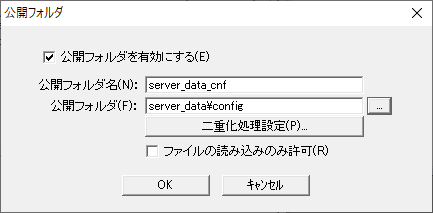
If you want to share configuration information on the server side using the Panel-Interface public folder, leave this property blank. This setting will automatically create the necessary subfolders in the folder defined as the Panel-Interface public folder name "server_data_cnf" and save the configuration information. If a public folder has not been created, refer to the following to create a public folder called "server_data_cnf" from the Panel Server Panel-Interface settings screen. For information on how to register a public folder, see "Panel-Interface Basics".
(Public folder settings for Panel-Interface: server_data_cnf)
•Enable public folder: Check •Public Folder Name: server_data_cnf •Public folder: server_data\config •Allow file reading only: Uncheck
■ When using the File server action
On the other hand, if you want to share the setting information on the server side using the File server action, specify the name of the action to connect to in this property. This will save the setting information in the target folder of the File server action.
|
|
Group Configuration File File name |
_GroupConfFile |
default:groupconf.csv
The file name of the group configuration file. Used internally by the split screen feature.
|
|
Group Settings Subfile File name |
_GroupConfSubFile |
default:groupconf_sub.csv
The file name of the group setting subfile. Used internally by the split screen feature.
|
|
Shows the selected group |
_GroupEnable |
default:True
It will be used as the initial value for "Hide the following groups" in the layout settings.
|
|
Maximum number of lines displayed |
_MaxRowCount
|
default:10
Set the upper limit for the total number of rows that can be set on the split display layout setting screen.
|
|
Maximum number of columns displayed |
_MaxColCount
|
default:10
Set the upper limit for the total number of columns that can be set on the split display layout setting screen.
|
|
Initial display number of lines |
_RowCount
|
default:2
Set the initial number of total rows to be displayed on the split display layout setting screen.
|
|
Initial display column count |
_ColCount
|
default:2
Set the initial number of columns to be displayed on the split screen layout settings screen.
|
|
Merge Column Count |
_MergeRow
|
default:1
Set the initial number of merge columns to be displayed on the split display layout setting screen.
|
|
Merge Row Count |
_MergeCol
|
default:1
Set the initial number of merge rows to be displayed on the split display layout setting screen.
|
|
Multilingual Settings |
Date and Time Format Name |
_DeteTimeFormat |
default:@DATETIME
Date display format. For details on date and time formats, see "Date and Time Formats" in the Appendix.
|