Video Recorder Settings Menu
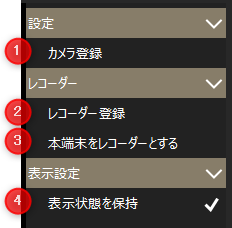
# |
name |
explanation |
|---|---|---|
1 |
Camera Registration
|
This will bring up the camera registration screen. For details on camera registration, please refer to "Camera Registration" in the Surveillance System Construction Guide.
|
2 |
Recorder Registration
|
|
3 |
Use this device as a recorder
|
Display the Recorder Device Registration Screen. If the client displaying the screen is registered as a recorder, a check mark will be displayed. |
4 |
Maintain Visibility
|
The settings changed on the screen will be retained. Note that the settings are saved for each client.
|