Prompt for password every time you start the program (using login INI)
If you want to be prompted for the password every time, specify the parameter using the login INI.
The following explains how to set up this operation.
1.Create a login INI file.
Please create a login INI file using a text editor such as Notepad. Details on the parameter specifications and execution method of the login INI are described in "About the login INI".
As an example, let's assume the file name is "login.ini" and define it as follows:
PSLoginProject ・・Set according to the actual project
PSNode - Same as above
PSNode2: Same as above
PSPanelPort...Same as above
PSPanelPort2...Same as above
PSAutoLogin=F - Disable automatic login
PSLoginSavePwd=F - Do not save password
*Do not define PSLoginUser and PSLoginPwd.
Definition example)
PSLoginProject=project PSNode=192.168.1.1 PSNode2= PSPanelPort=6001 PSPanelPort2= PSAutoLogin=F PSLoginSavePwd=F StartupApplicationTitle=Login StartupTitle=Login |
|
If you want to display the login screen every time and request a password, set PSAutoLogin=F, PSLoginSavePwd=F. By setting it in this way, the login screen will be displayed every time.
If you want to select the user name on the login screen from a combo box, you can do so by defining the StartupUserList parameter in the login INI.
example) StartupUserList=admin,senior,operator,guest
|

2.Create a shortcut
Create a Windows shortcut to run Panel Browser and specify the login INI file name in the /Login parameter after the Panel Browser execution path.
*"□" represents a half-width space. |
Setting example)
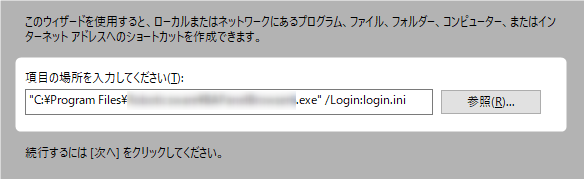
|
For details on how to create shortcuts, see "About Login INI". |
3.When the shortcut is launched, a direct login is performed according to the parameters specified in the login INI file.