Standard project login settings (Login settings for Panel-Interface/Public projects)
In a standard project, the login information is already set.
If necessary, change the settings to suit your actual operating environment.
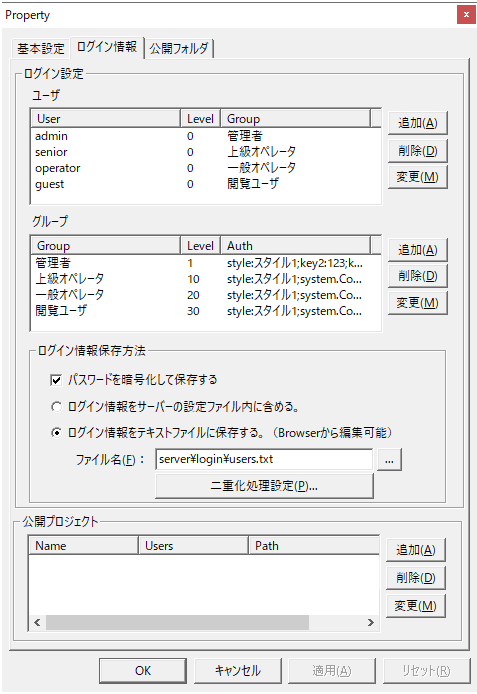
|
Shown on the left is the properties screen (login information) for Panel-Interface on Panel Server.
The following settings have been configured in advance:
Login settings/
User
|
Login user information for Panel Server.In a standard project, user information is edited from the client's user management screen, so there is no need to make any changes.
|
Login settings/
group
|
Group information for the user. As above,In a standard project, group information is edited from the client's user management screen, so there is no need to change it.
|
Login settings/
How to save login information
|
The following settings are already configured in the standard project. In most cases, there is no need to change them.
•"Encrypt and save passwords" - make sure to check the box
•"Save login information in a text file" - be sure to select this
•File name: server\login\users.txt - do not change
If you are using a duplicated configuration for Panel Server, please configure the duplication process. For details, please refer to "Operation with Server Duplication".
|
Public Projects
|
If you are running the program in file distribution format, you do not need to define a public project.
The following two public projects are registered by default, but if you do not want to run them via direct login, delete them.
•project
•debug
|
|