overview
This article explains how to display the client screen by incorporating Panel Browser into the Web browser "Internet Explorer" (hereinafter referred to as "IE") provided by Microsoft.
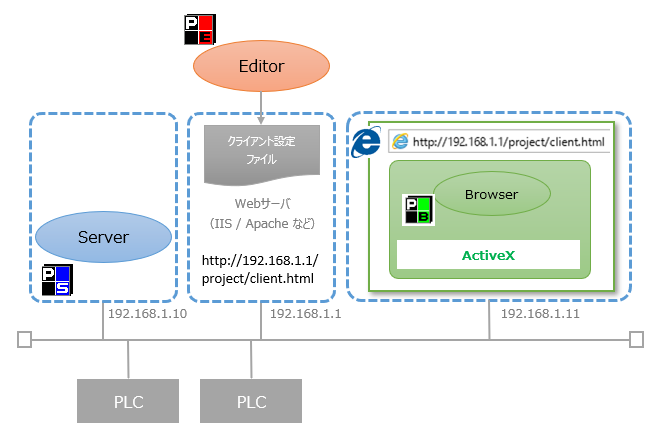
(Image of execution when embedded in IE)
|
When you use the Panel Editor setup function to run the program in IE, a set of files required for execution in IE is output (such as a file for accessing Web (html), a client configuration file, and a CAB file (including ActiveX in Panel Browser). If you place this set of files on the Web server and access the html file for accessing Web from IE, the client screen will be displayed via ActiveX in Panel Browser.
In addition, to run it with IE, a separate Web server is required to distribute the client screen. Also, Panel Browser must be installed on the PC where you run Panel Browser with IE.
|
Please refer to the following content for instructions on the setup process to integrate Panel Browser into IE and run it.
For information on how to run the client embedded in IE, please see the content below.
•Running the client embedded in IE
|
By running Microsoft Edge in IE mode, you can run it on Edge just like IE. For details, please refer to "When embedded in Edge".
|

|
If you want to run a client using a version of IE earlier than IE 11, you must create the client according to the instructions in "When using a version earlier than IE11". |
