Running the embedded client in IE
Start IE on the client PC you want to display, and specify "http://Web server address/location folder/Web access file" in URL.
If it works properly, the Panel Browser client screen will be displayed on IE. Please note that Panel Browser must be installed on the client PC that runs IE.
|
After opening the Html file, you can register it in Internet Explorer's "Favorites" to make it easier to select the file the next time you start the browser.
|

|
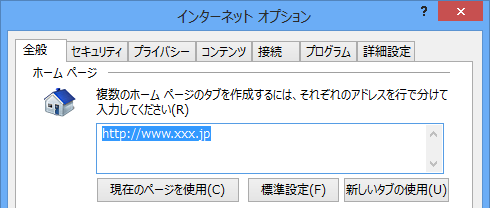
By specifying the path (URL) of the html file of the monitoring system in the address below from the "Tools" "Internet Options" menu of IE, the monitoring system will be automatically displayed when IE is started.
|
|
If you set the RunBrowserType root property to "WEB_BROWSER", the RUN icon in Panel Editor will call up IE. This function allows you to easily check the display in IE while developing a screen in Panel Editor. Note that you do not need to save the xml file before clicking the RUN icon. |
However, there are some precautions and restrictions when running in IE. Please see the precautions and tips below.
Screen display properties available when running IE
When displaying with Panel Browser embedded in IE, only the following root properties related to screen display are valid. Other root properties related to screen display are not reflected (for example, showing/hiding the title bar. The settings of these properties are ignored).
Root Properties (Browser group) |
|
DefaultForm |
The name of the initial form displayed when the browser is launched.
|
Stretch |
Stretch mode. The size of the form is automatically adjusted (enlarged or reduced) according to the following modes. In the case of IE, if the size of the form and the size of the IE screen are different, the adjustment will be based on the size of IE.
"NONE" - Display at actual size (no stretching). "STRETCH_FULL" - Stretch to fit the size "STRETCH_KEEPRATE" - Stretch to fit the size (keep aspect ratio)
|
ViewFillColor |
Background color of the view (outside the form).
|
Notes on running IE
There are some notes and restrictions when running in IE. Please see the notes and tips below.
|
When running Panel Browser embedded in IE, it is necessary to resolve the problem of system file path reference in some functions such as screen printing, video player, video recorder, etc. For details, please refer to "Important) About path reference to system files when running the client". |

|
If it does not start properly, you may need to change the Internet security settings. Please check the contents of "IE security settings". |
|
If you want to run a client using a version of IE earlier than IE 11, you need to create a client according to "If you use a version earlier than IE11". |
|
If you run Panel Server and Panel Browser (displayed in IE) on different PCs, be sure to specify the IP address of Panel Server in the PSNode route property (note that you must specify the IP address of the PC running Panel Server, not the IP address of the Web server). |
|
If you install it in IE, the following processes may not be available.
|