Alarm Screen Library
FA-Panel provides a screen library for the alarm function.
The following four functions are available as alarm-related screen libraries.
Screen Library Types |
overview |
|
|
This screen displays currently occurring alarms. Currently occurring alarms are displayed in list format.
|
|
|
This screen displays the history of past alarms. The history of alarm occurrences and recovery is displayed in a list.
|
|
|
This screen displays the history of past events. Note that events here refer to the operation history of equipment, etc.
|
|
|
This screen displays the event history in real time. |
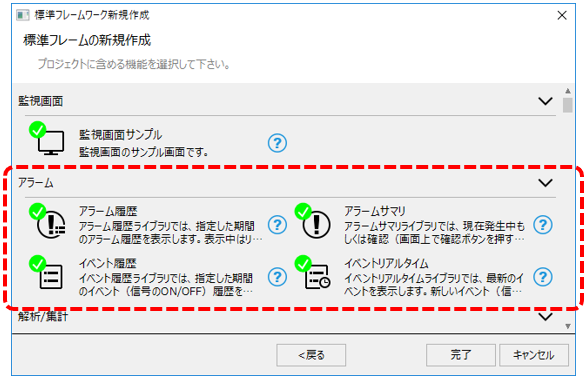
When using an alarm screen library, you can automatically generate a project that includes the required screen library by selecting the desired alarm function from the wizard screen of the standard framework.
(Standard framework wizard screen)
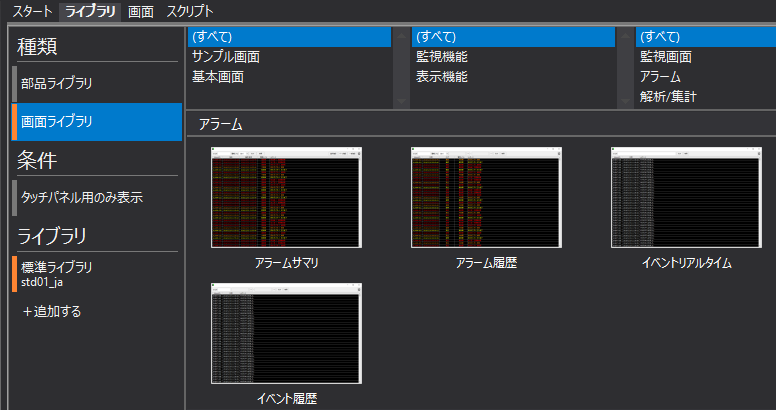
Alternatively, you can manually include and use the desired screen library from the Libraries tab in Panel Editor.
(Library tab in Panel Editor)
|
The screen library's "Alarm Summary", "Alarm History", "Event History", and "Event Real Time" are built using Alarm Control (Remote Alarm Grid/Remote Alarm Client). |
